Key takeaways
- The best Apple Arcade controllers for most players are the Xbox Wireless Controller for all-around use, the Backbone One for portable iPhone gaming, and the DualSense for a premium Mac, iPad, or Apple TV setup. Apple Arcade works with many…
The best Apple Arcade controllers for most players are the Xbox Wireless Controller for all-around use, the Backbone One for portable iPhone gaming, and the DualSense for a premium Mac, iPad, or Apple TV setup.
Apple Arcade works with many Bluetooth and wired gamepads, but “compatible” does not always mean equally convenient. The important differences are whether a controller fits your Apple device, how it connects, whether its buttons suit the games you play, and whether you can leave it ready in the living room or carry it everywhere.
Our top picks



As an Amazon Associate we earn from qualifying purchases at no extra cost to you. Ratings are shown as listed on Amazon.
Best Apple Arcade controllers at a glance
| Controller | Best for | Apple devices | Connection | Battery or power | Approx. weight |
|---|---|---|---|---|---|
| Xbox Wireless Controller | Best overall | iPhone, iPad, Mac, Apple TV | Bluetooth; USB-C wired | 40 hours with AA batteries | 287 g with batteries |
| Sony DualSense | Best premium feel | iPhone, iPad, Mac, Apple TV | Bluetooth; USB-C wired | About 6–12 hours, depending on use | 280 g |
| Backbone One | Best iPhone portability | Compatible iPhone models; selected USB-C iPads | Direct Lightning or USB-C connection | No internal battery | About 280 g |
| Razer Kishi V2 | Best wired phone grip | Compatible iPhone and USB-C devices | Direct Lightning or USB-C connection | No internal battery | About 123–126 g |
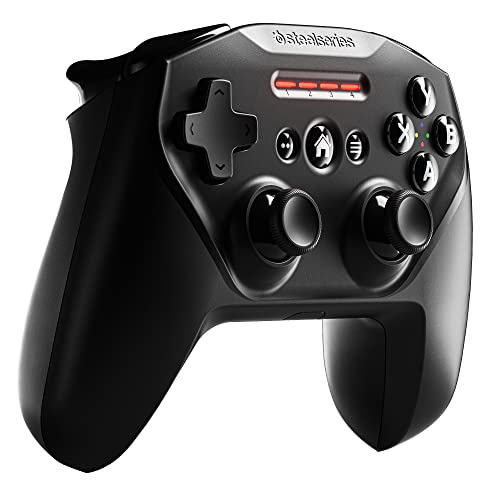
| SteelSeries Nimbus+ | Apple-focused living-room use | iPhone, iPad, Mac, Apple TV | Bluetooth; Lightning charging | Up to 50 hours | About 280 g |
| 8BitDo Ultimate 2C Wireless | Budget-friendly versatility | Mac, iPad, iPhone, Apple TV where supported | Bluetooth; wireless receiver on compatible platforms; USB-C | About 32 hours | About 227 g |
Weights and battery figures are approximate manufacturer specifications or typical published figures. Battery life changes with vibration, wireless mode, volume, and battery type. Check the exact model and connector before buying, especially for iPhone 15-and-newer USB-C devices.
Our picks by playing situation
Best overall: Xbox Wireless Controller
The Xbox Wireless Controller is the safest choice if one controller must cover Apple Arcade on an iPhone, iPad, Mac, and Apple TV. Its asymmetrical analog sticks, familiar ABXY layout, textured grips, clickable sticks, and dedicated Share button suit everything from platformers and racing games to twin-stick action titles.
Bluetooth pairing is simple, while USB-C allows wired play on a Mac or compatible iPad. Its two AA batteries can last around 40 hours, and replacing them takes seconds. The trade-off is that the batteries add weight and create an ongoing consumable cost. A rechargeable AA pair or the official rechargeable battery accessory reduces waste and avoids disposable batteries.
Choose the Xbox controller when you want broad compatibility, conventional ergonomics, and a controller that can remain paired to a television setup. Its main disadvantage is size: it is less convenient than a telescopic phone controller for commuting.
Best for premium comfort: Sony DualSense
The DualSense has a symmetrical stick layout, large grips, a precise D-pad, and excellent trigger and face-button feel. It is particularly comfortable for longer sessions on an iPad stand, Mac, or Apple TV. Its built-in rechargeable battery is convenient, although its typical runtime is much shorter than the Xbox controller’s AA life.
Some DualSense features, including advanced haptic feedback and adaptive triggers, depend on game and platform support. Do not buy it expecting every Apple Arcade title to reproduce the full PlayStation feature set. For ordinary controller input, it remains a strong premium option.
Best for iPhone portability: Backbone One
The Backbone One turns a compatible iPhone into a handheld-style system. Its left and right sections clamp around the phone, placing sticks, a D-pad, triggers, and face buttons beside the screen. Because it connects directly through Lightning or USB-C rather than Bluetooth, it has very low connection overhead and does not need charging.
It is the best fit for short sessions, travel, and users who dislike carrying a separate gamepad. The downside is device-specific compatibility. A Lightning model is not the right purchase for a USB-C iPhone, and a controller sized for a phone is not a practical replacement for a full-size iPad or Apple TV controller. Phone cases may also need to be removed, particularly thick or rugged cases.
The Backbone One includes a pass-through charging port, but accessories connected to the phone can affect fit and cable clearance. Confirm the exact connector, supported iPhone generation, and case clearance before ordering.
Best alternative wired phone controller: Razer Kishi V2
The Razer Kishi V2 is another telescopic option for iPhone and USB-C devices. It has a conventional handheld layout, microswitch-style face buttons on some versions, clickable analog sticks, and a direct phone connection. Like the Backbone One, it draws power from the phone and does not require a separate battery.
Its greatest advantage is low bulk in a backpack. Its limitations are the same: it is primarily a phone accessory, physical fit varies by connector and case, and it is not the best choice for couch gaming on Apple TV.
Best for an Apple-focused lounge: SteelSeries Nimbus+
The Nimbus+ is shaped around Apple-platform use, with a familiar symmetrical-stick layout, a D-pad, triggers, and a rechargeable battery rated for up to 50 hours. It is a sensible choice for an Apple TV or Mac that will stay in one room, especially if you prefer a lighter, traditional gamepad and do not need Xbox-style asymmetrical sticks.
Its Lightning charging connector is less convenient than USB-C in a modern mixed-device household. It also lacks the broad accessory ecosystem and instantly recognizable layout of the Xbox controller.
Best lower-cost versatile option: 8BitDo Ultimate 2C Wireless
The 8BitDo Ultimate 2C Wireless offers a comfortable full-size layout, Hall-effect sticks and triggers on versions that include those components, and a rechargeable battery. Hall-effect sensors can reduce the mechanical wear associated with traditional potentiometer sticks, although they do not make the controller indestructible.
Compatibility depends more carefully on operating mode than with the Xbox or DualSense. Bluetooth is the relevant connection for Apple devices; the included 2.4 GHz receiver is not automatically useful with every iPhone or Apple TV. Choose it when price, rechargeable operation, and stick longevity matter more than the simplest possible Apple setup.
Head-to-head: which layout and connection make sense?
| Priority | Prefer | Why | Compromise |
|---|---|---|---|
| Racing and action games | Xbox layout or DualSense | Full-size triggers and clickable sticks are easier to control | More weight than a phone grip |
| Platformers and retro games | Any model with a firm D-pad | Directional input is more important than advanced triggers | D-pad feel is subjective |
| Travel | Backbone One or Kishi V2 | Fits around the phone and has no battery to recharge | Phone-only design and case restrictions |
| Shared Apple TV | Xbox Wireless Controller or DualSense | Comfortable at a distance and easy to hand to another player | Requires charging or replaceable batteries |
| Lowest maintenance | Direct-connect phone controller | No Bluetooth pairing or controller battery management | Cannot replace a living-room gamepad |
How to set up an Apple Arcade controller
- Update the Apple device. Current iOS, iPadOS, macOS, or tvOS versions improve accessory compatibility and can resolve pairing failures.
- Put a wireless controller in pairing mode. Open Bluetooth settings on the iPhone, iPad, or Mac and select the controller. On Apple TV, open Settings, then Remotes and Devices, followed by Bluetooth.
- Use the controller settings panel. On iPhone and iPad, connected controllers can usually be customized under Settings and General. Button remapping is useful when a game’s default layout feels awkward.
- Test before starting a long session. Check both analog sticks, every trigger, the D-pad, and the Home or menu button. This catches a poor connection or a case interfering with a telescopic controller.
- For wired Mac play, use a data-capable USB cable. Some inexpensive cables provide charging only and will not carry controller input.
Ownership details that matter
Analog sticks and triggers are usually the first controls to show wear. Keep food, dust, and liquid away from the stick openings, and use a dry microfiber cloth rather than spraying cleaner directly onto the controller. Do not force a phone into a telescopic grip with a thick case attached. That can stress the connector, scratch the phone, or prevent the controller from sitting squarely.
For Bluetooth models, remove old pairings when moving between several Apple devices if the controller repeatedly reconnects to the wrong one. For rechargeable controllers, avoid storing them completely empty for months. For AA-powered models, remove disposable batteries during long-term storage to reduce the risk of leakage.
A simple runtime calculation explains why the best controller depends on frequency. If you play two one-hour sessions each week, that is about 104 hours per year. A 40-hour AA-powered controller would need roughly three battery changes per year under ideal conditions; vibration and battery quality may increase that number. A built-in rechargeable controller avoids disposable batteries but requires charging and eventually may need battery service or replacement.
Final recommendation
Buy the Xbox Wireless Controller if you want one dependable controller for iPhone, iPad, Mac, and Apple TV. Pick the Backbone One or Razer Kishi V2 if iPhone portability is the deciding factor. Choose the DualSense for premium full-size comfort, the SteelSeries Nimbus+ for a long-running Apple TV controller, and the 8BitDo Ultimate 2C Wireless when rechargeable operation and value are more important than the simplest compatibility path.