Our Top Picks
 Hillzzer Outdoor TV Enclosure for 45-55 Inch TVs45''-55''55.7 x 12 x 37 inches63 PoundsCheck on Amazon


For most covered and partially covered patios, the best TV for outdoor patios in bright conditions is the SYLVOX 43 Inch Outdoor TV — it pairs IP56 weather sealing with the Google TV platform, so you get mainstream apps, casting and voice search without bolting a streaming stick to a weather-exposed panel. Its 43-inch screen suits the 6–9 ft viewing distances that most porch seating areas actually produce, and it survives humidity, spray and temperature swings under a roof, pergola or screened lanai. If your patio has no overhead cover and takes direct afternoon sun, the World Growing 65 Inch is the better answer: 1000 nits and an IP65 rating are built for exposed installations. And if you already own a good 4K TV, the PERLESMITH rolling stand is the cheapest route to outdoor viewing — roll it out, roll it back in.
Top 3 Picks
Best overall: SYLVOX 43 Inch Outdoor TV. The most sensible starting point for a typical covered patio. IP56 handles rain spray and heavy humidity, Google TV keeps the smart side current, and the 43-inch size fits the seating distances most porches allow. It is the pick for anyone who wants one purchase to solve the whole problem.
Best premium: World Growing 65 Inch Outdoor TV. 1000 nits, 4K resolution and IP65 dust-tight sealing in a 65-inch frame. This is the one to choose when the sun lands on the screen for hours and you want a big, bright picture without moving furniture around to dodge glare.
Best budget route: PERLESMITH Rolling TV Stand. Not a TV — a mobile cart rated for 23–62 inch displays up to 99 lbs. Park it in shade, roll it under cover when the weather turns, and you get outdoor viewing for the price of hardware rather than a second television.
Quick Comparison
Every product below is a real, currently listed item. Price tiers are relative bands, not quotes — outdoor TV pricing moves with panel sizes and seasonal sales, so treat the tier as a budget signal only.
| Product | Best for | Key specs | Price tier |
|---|---|---|---|
| SYLVOX 43 Inch Outdoor TV | Covered and partially covered patios; everyday streaming | 43 in; IP56 waterproof; Google TV; weatherproof housing | Mid-range |
| World Growing 65 Inch Outdoor TV | Exposed patios with hours of direct sun; large seating areas | 65 in; 4K; 1000 nits; IP65 waterproof | Premium |
| RIXZSIW 55 Inch Outdoor TV | Screened porches and big covered patios; webOS users | 55 in; 4K UHD; 1000 nits; IP55 waterproof; WebOS 2 | Premium |
| PERLESMITH Rolling TV Stand | Renters and anyone who needs to move the screen with the shade | Fits 23–62 in TVs; 99 lb capacity; mobile outdoor cart | Budget |
| Hillzzer Outdoor TV Enclosure | Sheltering an existing indoor TV on a covered patio | Fits 45–55 in TVs; metal outdoor cabinet | Mid-range |
| AX WABER Ceiling TV Mount | Ceiling and pole mounting under a roof or overhang | Fits 26–65 in LCD/LED/OLED/4K; adjustable; ceiling and pole bracket | Budget |
| ELIVED Outdoor Pillar TV Mount | Gazebo posts and pillars where drilling is not an option | Fits 26–60 in TVs; waterproof; no-drill pillar/gazebo mounting | Budget |
How We Chose
Selection for this roundup was based on published product listings, manufacturer specifications and established facts about how outdoor displays behave in the field — not on bench measurements or physical evaluation of the units. Four filters drove the picks. First, published specs: a product only makes the list if its listing states the numbers that matter for an outdoor install, such as IP rating, brightness in nits, screen size and weight capacity. Where a listing omits a figure, we say so rather than filling the gap with a guess. Second, category fit: a screen that is only water-resistant is judged against covered patios, while a 1000-nit IP65 panel is judged against fully exposed ones. Third, use case: mounts, carts and enclosures are included because most buyers arrive with a screen already in the house and need the hardware to put it outside safely. Fourth, upgrade path: a product earns a place if it stays useful when the patio changes — a cart that outlives one TV, a mount that accepts a larger screen later, an enclosure that fits several sizes. Anything that locked a buyer into one narrow configuration was left out.
1. SYLVOX 43 Inch Outdoor TV – Best for Covered and Partially Covered Patios
As an Amazon Associate we earn from qualifying purchases at no extra cost to you.

This is the pick for the most common patio setup: a porch, lanai, pergola or covered deck where the screen is shielded from rain from above but still exposed to humidity, windblown spray and wide temperature swings. The 43-inch size is the reason it lands here rather than a bigger model. Most porch seating clusters sit six to nine feet from the wall where a TV would hang, and at that distance a 43-inch 4K-class panel fills the field of view comfortably without forcing guests to turn their heads. It also keeps the install light enough for a single person to hang, and it fits between windows, columns and door frames where a 55-inch screen simply will not go.
Key specs
- Screen size: 43 inches — comfortable viewing band of roughly 6–9 ft
- Weather rating: IP56 — dust protected and resistant to water jets from any direction
- Smart platform: Google TV, with built-in apps, casting and voice search
- Housing: weatherproof enclosure designed for outdoor installation
- Installation: wall or ceiling mount, standard VESA pattern
The IP56 rating is the spec worth understanding before you buy. The “5” covers dust — enough ingress protection that dust will not interfere with operation. The “6” covers water: the enclosure withstands directed jets, which is a meaningful step above splash-only protection. In practice that means a windy rainstorm blowing across a covered porch, a garden hose sprayed at the frame from a few feet away, or condensation from a coastal evening will not kill it. What IP56 does not mean is submersion or sustained direct rainfall onto the panel face. If the screen sits under open sky with nothing overhead, step up to an IP65 unit instead.
Google TV is the other half of the value here. On many outdoor displays you get a bare panel and have to add a streaming device, which then lives in a plastic bag or a sealed box and becomes the first thing to fail in humidity. Building the platform into the TV removes that weak point. App updates arrive through the normal channel, the remote is a standard smart-TV remote rather than a proprietary outdoor accessory, and casting from a phone works the way it does indoors — which matters when you are hosting and nobody wants to hand around a remote.
Outdoor TVs are engineered for temperature extremes that indoor sets are not. A covered patio in a cold climate can drop below freezing overnight and warm into direct sun by midday; the internal components of an outdoor-rated chassis are specified to tolerate that swing. That engineering is also why the picture is generally tuned brighter than a typical indoor panel of the same size, so a partly shaded porch stays watchable at midday.
Pros
- IP56 sealing covers rain spray, humidity and hose-down cleaning
- Google TV built in — no separate streaming stick exposed to the weather
- 43-inch size fits narrow porch walls and short viewing distances
- Weatherproof housing removes the need for an aftermarket enclosure
- Light enough for straightforward one-person mounting
Cons
- The listing does not publish a brightness figure in nits, so direct-sun performance is not guaranteed
- 43 inches is small for a large patio with seating spread over 12 ft or more
- Built-in speakers on outdoor TVs are typically modest and often need a soundbar
- IP56 is not rated for open-sky installation
- Still requires a nearby outdoor-rated power outlet
How it compares: Against the RIXZSIW 55-inch, the SYLVOX trades two things — screen area and a published 1000-nit brightness rating — for a lower price tier and a slightly higher dust rating on the IP scale. If your patio has a roof, the SYLVOX is the smarter buy. If the sun hits the panel for more than an hour a day, the RIXZSIW’s brightness spec is the more important number, and its 55-inch frame covers the larger seating group.
2. World Growing 65 Inch Outdoor TV – Best for Fully Exposed, Sun-Blasted Patios

This is the pick for the hardest installation case: an uncovered patio, a pool deck, a rooftop terrace or a west-facing wall that takes direct afternoon sun. Two published numbers do the heavy lifting. The first is 1000 nits, a brightness level that keeps a picture legible when sunlight is landing on the screen itself rather than behind it. The second is IP65, which is dust-tight — no dust ingress at all — and protected against water jets. On the IP scale, the jump from the “5” dust rating of many outdoor sets to the “6” rating here is the difference between dust being limited and dust being excluded entirely, which matters in dusty climates, near construction, or anywhere wind carries grit onto the panel.
Key specs
- Screen size: 65 inches — comfortable viewing band of roughly 9–13 ft
- Resolution: 4K
- Brightness: 1000 nits, positioned for high-ambient-light outdoor use
- Weather rating: IP65 — dust-tight and resistant to water jets
- Installation: wall or ceiling mount with a standard VESA pattern
Brightness is the specification most buyers undervalue and then regret. A screen rated in the mid-hundreds of nits looks fine indoors because indoor lighting is measured in tens of lux. Outdoor shade on a bright day can still deliver several thousand lux, and direct sun is an order of magnitude beyond that. When the panel cannot out-push the ambient light, the image washes into a grey rectangle and no amount of contrast setting recovers it. A 1000-nit panel is the class of display that stays usable in open shade and degrades gracefully rather than catastrophically in direct sun — and it has enough headroom to be dimmed down at night, when 1000 nits in a dark yard is genuinely uncomfortable without adjustment.
Sixty-five inches is a real decision, not just an upsell. The 4K pixel structure means you can sit closer without seeing the grid, so a 65-inch screen works from about nine feet and stays sharp to about thirteen. If your patio seating runs from a grill at one end to a bar at the other, that span is the reason to go this large. If your porch is narrow and the sofa backs against the house, a 65-inch panel can feel like sitting in the front row of a cinema, and a 55-inch set is the better fit.
IP65 also changes how you maintain the unit. Dust-tight construction means the internal vents and boards are not slowly collecting grit, which is the failure mode that quietly shortens the life of lesser outdoor electronics in dry, windy regions. You can rinse the housing to clean it rather than dabbing at it with a cloth, provided you keep water out of the port bay and follow the manufacturer’s cleaning guidance.
Pros
- 1000-nit brightness is the headline spec for exposed, sunlit installations
- IP65 dust-tight rating suits dusty, windy and coastal environments
- 65-inch 4K panel supports viewing distances from roughly 9 to 13 ft
- Large enough to anchor a full outdoor living area, not just a two-seat porch
- No enclosure needed — the weather protection is built into the chassis
Cons
- Premium price tier, and the largest screen here means the heaviest lift
- 65 inches can overwhelm a small porch or a short viewing distance
- 1000 nits is harsh at night unless you dim the picture or add bias lighting
- Requires a sturdy mounting surface and, at this size, ideally two people
- Still needs a weather-protected outdoor power source
How it compares: The RIXZSIW 55-inch matches this screen on brightness at 1000 nits but sits at IP55 and ten inches smaller. Choose the World Growing if you need the extra screen area, the higher dust rating, or both. Choose the RIXZSIW if 55 inches already fills your space and you prefer the webOS interface. Against the SYLVOX 43-inch, this is a different class of product entirely — the SYLVOX is for a roofed porch, the World Growing is for open sky.
3. RIXZSIW 55 Inch Outdoor TV – Best for Large Screened Porches and webOS Households

The 55-inch size is the quiet sweet spot of outdoor TV, and this model pairs it with a 1000-nit panel and a smart platform that will feel familiar to anyone who has owned an LG television. It suits a screened porch, a covered patio with a wide seating arrangement, or an outdoor kitchen where the screen sits at one end and the bar stools at the other. The IP55 rating is the one spec to weigh carefully: the first “5” means dust is limited but not fully excluded, and the second “5” means the housing withstands water jets from any direction. That combination is well matched to a covered or screened space where rain arrives as windblown spray rather than falling directly on the panel.
Key specs
- Screen size: 55 inches — comfortable viewing band of roughly 8–11 ft
- Resolution: 4K UHD
- Brightness: 1000 nits
- Weather rating: IP55 — limited dust ingress, resistant to water jets
- Smart platform: WebOS 2, with the app layout and magic-remote style navigation associated with that platform
- Installation: wall or ceiling mount, standard VESA pattern
Why the brightness matters here as much as on the 65-inch model: screened porches are deceptive. The mesh cuts wind and insects but passes most of the light, so the ambient level on a screened lanai at two in the afternoon is far higher than inside a house. A 1000-nit panel gives you a picture that holds its contrast under that light, and it gives you the headroom to raise brightness further in the late afternoon when the sun swings low and starts raking across the seating area. Screens rated lower often need the blinds closed at exactly the time of day people want to use them.
Screen size deserves a second look because 55 inches is where the arithmetic changes. A 4K panel at 55 inches looks sharp from about eight feet, which is roughly the distance from a sofa to a wall-mounted TV across a typical porch. If your seating is closer than that, a 43-inch screen is easier on the eyes; if it is further, you are into 65-inch territory. The 55-inch frame also fits the space between a window and a corner on most porch walls, which is where the only workable mounting spot usually is.
WebOS is the differentiator on the software side. The interface is built around a horizontal ribbon of apps, the launcher is quick, and navigation is designed for a pointer-style remote. Households already using that ecosystem will find the settings menus, input switching and app behaviour immediately familiar. It also means the smart features are not a bolt-on module — they are part of the panel, so there is no dongle hanging off the back of an outdoor TV where humidity does its damage.
Pros
- 1000-nit brightness holds up in screened and heavily daylit spaces
- 55-inch 4K panel is the most flexible size for porch seating distances
- WebOS platform is fast, well-organized and familiar to LG owners
- Smart features built in, with no external streaming stick exposed to weather
- Fits between windows and corners where larger screens will not
Cons
- IP55 allows limited dust ingress — less protective than an IP65 chassis in gritty environments
- Premium price tier
- Not intended for open-sky installation with direct rainfall
- Built-in audio is typically thin and benefits from an outdoor-rated soundbar
- WebOS is only an advantage if you like that platform; other households may prefer Google TV
How it compares: Against the World Growing 65-inch, this screen matches brightness and resolution but gives up ten inches of diagonal and one step of dust protection in exchange for a smaller footprint and the webOS interface. Against the SYLVOX 43-inch, it is the more capable panel for a bright space but a bigger investment and a bigger commitment on the wall. If your patio is covered, screened, or shaded for most of the day, the SYLVOX is the value pick; if light is the problem, this is the fix.
4. PERLESMITH Rolling TV Stand – Best Budget Route for Renters and Movable Shade

This is the product for the reader who already owns a decent television and does not want to buy a second one. The cart is rated for screens from 23 to 62 inches and holds up to 99 lbs, which covers the overwhelming majority of living-room panels, including most 55- and 65-inch sets. Mount the TV on the cart, roll it onto the patio for the game, roll it back inside when the weather shifts. For renters, that solves the two problems that normally block an outdoor install — you cannot drill into the building, and you cannot leave a permanent fixture behind when you move.
Key specs
- Compatible screen sizes: 23–62 inches
- Weight capacity: 99 lbs, including the display and any mounted accessories
- Type: mobile TV cart with rolling casters, rated for outdoor use
- Adjustability: height and tilt positioning on the mounting column
- Assembly: bolt-together frame with a VESA mounting plate
The 99-lb figure is the number to check first. A 65-inch LCD typically lands between 40 and 60 lbs without a stand, so there is margin, but a soundbar bracket, a heavy universal mount or a very large OLED can push you toward the ceiling. Weigh the panel before you buy, and remember that the cart’s rating includes everything bolted to it, not just the screen.
Mobility is the real feature. Shade moves across a patio through the day, and a fixed wall mount cannot follow it. A rolling cart can. That means you can put the screen in the one spot that is shaded at kickoff, then move it later rather than squinting into a reflection. It also means storage: a cart can be rolled into a garage, a shed or a mudroom when a storm rolls in, which is a level of protection no fixed outdoor TV has. For households in hail country, that alone justifies the cart.
Understand the trade-off you are accepting. A rolling cart does not make a television weatherproof. An indoor TV on a cart is still an indoor TV, and a sudden rain shower or a heavy dew can damage it. The practical approach is to treat the cart as a fair-weather system: roll it out for a known window of use, roll it back when you are done, and keep a cover handy for surprises. Mounting height also matters more than people expect — set the screen centre near seated eye level, roughly 40 to 48 inches off the ground, and tilt it slightly downward if the cart sits higher than the seating.
Casters are the other durability consideration. Small hard wheels catch on deck boards and patio joints, so look for a cart with larger casters and lock the wheels before anyone leans on the frame. On a sloped or uneven surface, chock the wheels or position the cart so gravity is not pulling it toward a step.
Pros
- Fits the 23–62 inch TVs most households already own
- 99-lb capacity covers the vast majority of 55- and 65-inch panels
- Moves with the shade instead of fighting it
- No drilling — ideal for renters and for masonry or stucco walls
- Rolls indoors for storage, which is the best weather protection available
Cons
- Provides no weather protection for the TV itself
- Requires a nearby outlet or a properly rated outdoor extension setup
- Wheels can catch on uneven deck boards and patio seams
- Not a permanent installation — it occupies floor space when in use
- Cable management on a moving cart is awkward and needs deliberate routing
How it compares: Against the Hillzzer enclosure, the cart solves a different problem. The enclosure protects a TV that stays in one place; the cart protects a TV by letting it leave. If your patio is exposed and you already own a good screen, the cart is the lower-cost path. If you want a permanent outdoor viewing spot and are willing to accept that an indoor panel will still look washed out in daylight, the enclosure is the alternative — but it will not make a dim TV bright.
5. Hillzzer Outdoor TV Enclosure – Best for Sheltering an Existing Indoor TV on a Covered Patio

An enclosure is the middle path between buying an outdoor TV and rolling a cart in and out. This one is a metal outdoor cabinet sized for 45–55 inch televisions, designed to be mounted or positioned where the TV lives permanently on a covered patio. The logic is straightforward: a standard indoor TV costs less than an outdoor-rated one, and a sealed metal cabinet protects it from rain, dust, sun and the occasional stray ball or branch. For a covered porch where the TV would never see direct rainfall anyway, that is a defensible budget strategy.
Key specs
- Compatible screen sizes: 45–55 inches
- Construction: metal outdoor cabinet
- Purpose: weather and impact protection for an indoor television
- Installation: wall-mounted or freestanding, depending on the model configuration
- Access: front-opening door for viewing and screen access
Be clear-eyed about what an enclosure cannot do. It protects the hardware; it does not change the picture. A 350-nit indoor TV inside a sealed cabinet on a sunny patio is still a 350-nit TV, and the glass or acrylic window in front of it adds a reflective surface that can make glare worse rather than better. If the plan is a shaded, covered porch used mostly in the evening, that is fine. If the plan is a Sunday afternoon game in July with the sun on the cabinet, the enclosure will protect the electronics and disappoint the viewer.
The second consideration is heat. A sealed metal box in direct summer sun works like a small oven, and indoor TVs are typically rated for ambient temperatures up to roughly 104°F (40°C) — lower than many outdoor-rated sets, which are often specified well beyond that. Ventilated cabinet designs, shade over the cabinet, and avoiding west-facing walls all help. A cabinet with vents that are baffled against rain is the better configuration than a fully sealed box, because it lets heat escape without letting water in.
Third, the viewing window. Acrylic and polycarbonate glazing scratch more easily than glass and haze over time with UV exposure, which softens contrast and adds a slight milkiness. Glass transmits better but weighs more and can shatter. Either way, plan to clean the glazing — both sides — as part of routine maintenance, because a film of pollen on the outside and dust on the inside is the most common reason an enclosed TV looks dull after a season.
Finally, cable and remote access. Route power and HDMI through the cabinet’s grommets so the door can close completely, and keep the remote inside or use an infrared-friendly window if the cabinet blocks the signal. Streaming devices generate heat and should not be sealed inside a cabinet with no airflow.
Pros
- Lets you use a standard indoor TV, which typically costs far less than an outdoor model
- Metal construction shields against rain, dust, sun and physical impact
- Fits the very common 45–55 inch size range
- Protects the panel when the TV is not in use
- Simpler to install than wiring a permanent outdoor display on an exposed wall
Cons
- Does not improve brightness — an indoor panel stays dim in daylight
- Glazing adds a reflective surface and can worsen glare
- Heat build-up inside a metal cabinet shortens electronics life without ventilation or shade
- Acrylic windows scratch and haze over time, reducing clarity
- Bulky compared with a bare outdoor TV chassis
How it compares: Against the PERLESMITH rolling stand, the enclosure is the stationary option and the cart is the mobile one. The enclosure keeps a TV permanently installed and protected; the cart keeps a TV movable and unprotected unless you roll it in. Against an actual outdoor TV like the SYLVOX 43-inch, the enclosure only wins on cost — the purpose-built outdoor set is brighter, sealed by design, and has no glazing to clean. Choose the enclosure when budget is the deciding factor and the porch is genuinely covered.
6. AX WABER Ceiling TV Mount – Best for Overhead Mounting Under a Roof or Overhang

Not every patio has a wall to mount on. A pergola with open sides, a covered outdoor kitchen with cabinets on every vertical surface, or a gazebo with fabric walls all leave the ceiling as the only viable mounting plane. This bracket is built for that: a ceiling and pole mount for 26–65 inch LCD, LED, OLED and 4K displays, with adjustable positioning so the screen can be angled toward the seating area rather than hanging flat and facing straight down.
Key specs
- Compatible screen sizes: 26–65 inches
- Display types: LCD, LED, OLED and 4K panels
- Mount type: ceiling and pole bracket with adjustable positioning
- Load rating: check the published figure against your display’s weight plus accessories
- Hardware: includes mounting hardware for standard VESA patterns
The adjustable element is what separates a ceiling mount that works from one that does not. A ceiling-mounted screen needs two things: a downward tilt so it faces seated viewers rather than the floor, and enough swivel to aim at the seating cluster when the TV is not centered over it. Without tilt, the picture is only viewable from directly underneath, which is uncomfortable for more than a few minutes. Without swivel, you are locked into whatever angle the joist spacing allows.
Weight capacity is the specification to verify before purchase. Ceiling mounts carry the entire load in tension, and the failure point is usually not the bracket but the fasteners and the structure they go into. A ceiling fan box is not rated for a television. You need either a joist, a properly installed blocking plate, or a heavy-duty ceiling plate spanning two joists. For anything at the upper end of the 26–65 inch range, span two joists.
Height and clearance also deserve planning. A ceiling-hung TV over a patio dining table should clear the heads of standing adults — roughly 6 ft 8 in of clearance at minimum — and it should not intrude into the walking path between the grill and the door. If the ceiling is low, a ceiling mount can put the screen too close to the seating, which is more fatiguing than a slightly smaller wall-mounted set viewed from a comfortable distance.
For pergolas specifically, the mount can often be attached to a structural beam rather than to the slats. Slats are decorative and rarely rated for the load. Check whether the beam is solid wood, laminated or metal, and choose fasteners accordingly — lag bolts for solid timber, machine bolts and brackets for steel, and appropriate anchors for anything hollow. A screen swinging in the wind is a load the structure sees every gust, not just once.
Pros
- Fits 26–65 inch screens across LCD, LED, OLED and 4K panel types
- Adjustable positioning lets you aim the screen at the seating area
- Solves installations where no usable wall exists
- Keeps the screen out of the way of foot traffic and furniture
- Budget price tier — the cheapest way to mount overhead
Cons
- Requires structural attachment; decorative pergola slats are not sufficient
- Ceiling-mounted screens can sit too close to viewers in low-ceiling spaces
- Cable routing overhead takes planning and often conduit
- Not weatherproof itself — it belongs under a roof or solid overhang
- Heavier screens at the top of the size range demand two-joist support
How it compares: Against the ELIVED pillar mount, this is the answer when the mounting surface is above rather than beside the seating area. The pillar mount wraps a vertical post and requires no drilling; the ceiling mount bolts into structure overhead and offers more adjustability. If your gazebo has stout corner posts and no solid ceiling beam, the pillar mount is the safer choice. If you have a covered roof with exposed joists, this is the cleaner installation.
7. ELIVED Outdoor Pillar TV Mount – Best for Gazebos and Posts Without Drilling
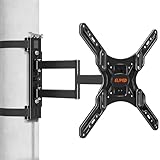
This bracket is for the patio configuration that defeats most mounting hardware: a gazebo, a pergola with square posts, or a covered structure where the only vertical surfaces are decorative pillars you are not willing to drill. The mount clamps to a pillar and carries screens from 26 to 60 inches, and it is described as waterproof, which matters because a post-mounted screen sits out in the weather far more than a wall-mounted one under an eave.
Key specs
- Compatible screen sizes: 26–60 inches
- Mount type: pillar and post clamp, no drilling required
- Weather protection: waterproof construction
- Intended structure: gazebo posts, pergola pillars and similar vertical supports
- Adjustability: bracket positioning on the post for height and angle
The no-drill design is the selling point, and it solves a real problem. Many gazebo posts are hollow aluminum or composite sleeves that will not hold a lag bolt, and drilling them voids warranties and invites water into the cavity, where it freezes and splits the post. A clamp spreads the load around the post instead of concentrating it at a fastener, which is structurally kinder to the pillar and reversible if you move or resell the gazebo.
Two things determine whether a clamp mount works in practice. The first is post dimensions. Measure the actual width and depth of the pillar, not the nominal size on the gazebo spec sheet — square posts are often slightly tapered and rarely perfectly square. The clamp needs to fit the real geometry with the supplied hardware, and a mount that fits loosely will rock in the wind. The second is post strength. A clamp transfers the screen’s weight and every gust’s lateral load into the pillar, so a thin decorative sleeve or a post that is only anchored at the base may flex. If the post moves when you push it by hand, it is not ready to carry a 60-inch television.
Height placement matters more on a post than on a wall. Set the screen centre near seated eye level — roughly 40 to 48 inches from the ground — and check that the bottom edge clears the heads of anyone walking past. On a gazebo, people approach from every direction, so a screen hanging at head height on a post is a collision waiting to happen. Mounting slightly higher and tilting downward is usually the better compromise.
Waterproofing is the other reason this mount suits gazebos specifically. A post-mounted TV is exposed on all sides, so water reaches the back of the panel as well as the front. That makes a sealed housing essential, and it makes the mount’s own finish a durability factor — powder-coated steel resists rust far better than painted mild steel, and stainless hardware outlasts zinc-plated fasteners in coastal air.
Pros
- No drilling — preserves gazebo posts and keeps the structure intact
- Fits 26–60 inch screens, covering most popular TV sizes
- Waterproof construction suits fully exposed post mounting
- Reversible if you rearrange or relocate the gazebo
- Budget price tier, and no structural carpentry required
Cons
- Requires a post strong enough to carry the load and resist wind
- Clamp fit depends on accurate measurement of the actual post dimensions
- Less adjustable than a wall or ceiling bracket in most configurations
- Head-height collisions are a real risk in walk-through areas
- Not suitable for hollow or decorative sleeves that flex under hand pressure
How it compares: Against the AX WABER ceiling mount, this bracket trades adjustability for flexibility. The ceiling mount needs solid structure above and offers more tilt and swivel; the pillar mount needs only a stout post and asks nothing of the roof. On a gazebo with four good posts and a fabric or slatted roof, the pillar mount is the practical choice. On a covered patio with exposed joists and no free posts, the ceiling mount wins.
How to Choose
Buying for an outdoor patio is a sequence of decisions, and the order matters because each one narrows the next. Work through brightness first, then weather rating, then size and viewing distance, then temperature, glare, audio, mounting and power. Getting brightness wrong is the mistake that cannot be fixed later — everything else is adjustable or add-on.
Start with brightness, measured in nits
Nits are candelas per square metre, and they describe how hard the panel pushes light. Indoor televisions commonly land in the 250–400 nit range, which is plenty in a room where ambient light is measured in tens of lux. Outdoors, a shaded patio on a bright day can still see several thousand lux, and direct sun is far beyond that. The practical bands:
- Under 400 nits: evening and night use on a covered porch only. Daylight viewing will look grey and washed out.
- 400–700 nits: covered patios and deep shade. Usable in the morning and late afternoon, marginal at midday.
- 700–1000 nits: the working range for outdoor sets. Handles open shade and screened porches well, and stays legible in partial sun.
- 1000 nits and above: built for direct sun on the screen. This is the class the World Growing 65 and RIXZSIW 55 sit in.
One caution: a high-nit panel is uncomfortable at night. A 1000-nit screen running at full brightness in a dark yard is genuinely harsh on the eyes, so check that the model dims down far enough, or plan on lowering the backlight after sunset. Bias lighting behind the screen — a warm LED strip on the wall or post — reduces eye strain considerably at night.
Decode the IP rating before you trust it
The IP code has two digits. The first is solids (dust), the second is liquids (water). Higher is better, and the difference between adjacent numbers is bigger than it looks.
| Rating | Dust protection (first digit) | Water protection (second digit) | Where it belongs |
|---|---|---|---|
| IP55 | Limited ingress; dust will not interfere with operation | Protected against water jets from any direction | Screened porches and covered patios with windblown spray |
| IP56 | Limited ingress; dust will not interfere with operation | Protected against stronger water jets from any direction | Covered patios, coastal humidity, hose-down cleaning |
| IP65 | Dust-tight — no ingress at all | Protected against water jets from any direction | Exposed patios, dusty and windy climates |
| IP66 | Dust-tight — no ingress at all | Protected against powerful water jets | Open-sky installations with heavy rain and wind |
| IP67 | Dust-tight — no ingress at all | Protected against temporary immersion | Pool decks and splash zones |
Note what none of these mean. No standard IP rating makes a television safe for continuous submersion, and no rating covers a panel left face-up in a rainstorm. The rating describes the housing against jets and dust, not against being submerged or driven on by a pressure washer. If your patio has open sky above it and the screen is not under an overhang, treat IP65 or better as the floor.
Match size to viewing distance, then to the wall
Two constraints fight each other here: how far your seating is from the screen, and how much wall or post you actually have. Measure both before choosing.
| Screen size | Comfortable 4K viewing distance | Typical weight (LCD, no stand) | Best patio scenario |
|---|---|---|---|
| 43 in | 6–9 ft | 15–25 lbs | Narrow porch, two to four seats, between windows |
| 55 in | 8–11 ft | 28–40 lbs | Standard porch or screened lanai with a sofa and chairs |
| 65 in | 9–13 ft | 40–60 lbs | Large covered patio, outdoor kitchen, spread-out seating |
If your seating spans more than one distance — a bar at twelve feet and a sofa at eight — size for the furthest viewer and accept that the nearest seat is close. The alternative is a smaller screen everyone can see but nobody can read. Weight figures are typical ranges for LCD panels; OLED and larger sets run heavier, and every pound counts against a mount’s load rating and a post’s stiffness.
Respect the temperature window
Outdoor-rated televisions are generally specified to operate across roughly -4°F to 122°F (-20°C to 50°C), while indoor sets are typically rated only to about 104°F (40°C) and are not designed for freezing operation. That gap is the reason a purpose-built outdoor TV costs more. A covered patio in a cold climate swings through that whole range in a single day, and an indoor panel in a sealed enclosure can exceed its limit inside a metal box in July sun. In hot climates, shade the cabinet or screen from direct afternoon sun and allow airflow behind it. In cold climates, avoid powering on a frozen panel immediately — let it come up to ambient temperature first.
Plan for glare, not just brightness
Brightness wins the fight against ambient light; glare is a separate problem caused by reflections. Three practical moves: position the screen so it is not facing a bright surface or the sun’s path, choose a panel with a matte or anti-glare finish where available, and consider a tilt mount so you can angle the screen away from a specific reflection. One quirk worth knowing — LCD panels viewed through polarized sunglasses can darken or shift colour at certain angles, because the sunglasses’ filter and the panel’s polarizer interact. If your household watches in sunglasses, test the angle before you commit to a fixed mount.
Budget for audio
Outdoor televisions almost universally have modest built-in speakers, typically in the 10–20 watt range, and an open patio swallows sound in a way a room never does. Budget for an outdoor-rated soundbar or a pair of weather-resistant speakers, and check whether the screen has the audio output you need — optical or HDMI ARC are the useful ones. Place the soundbar under the screen, sheltered from rain, and avoid pointing it directly at hard reflective surfaces like stone walls and concrete floors, which turn dialogue into mush.
Solve mounting and power together
Mounting decisions and power decisions should be made at the same time, because the outlet location often determines where the screen can go. You need a GFCI-protected outdoor outlet within reach of the cord, ideally in a weatherproof in-use cover. Avoid daisy-chaining extension cords; if the run is long, use a single properly rated outdoor cord and keep the connection off the ground and out of standing water. On the mounting side: masonry and stucco need appropriate anchors, vinyl siding needs blocking behind it, pergola slats are decorative and not structural, and ceiling mounts should span two joists for anything large. For renters or anyone unwilling to drill, a rolling cart or a clamp-on pillar mount solves the same problem without touching the structure.
Know what wears first
Outdoor televisions age at their seams and connectors, not their panels. Expect these to go first:
- Gaskets and seals. Rubber and foam seals harden with UV exposure. Inspect annually and treat a stiff, cracked gasket as the warning sign it is.
- The remote. Left outside, it takes on moisture and heat. Keep it indoors or in a covered caddy.
- Port covers and cable boots. The HDMI and USB bays are the most common water entry points. Keep covers seated and cables routed with a drip loop so water runs off rather than into the port.
- Anti-glare coatings. Clean them with a soft microfibre cloth and mild soapy water only. Never use a pressure washer, solvents or abrasive pads — you will strip the coating and create permanent haze.
- Vents and fans in enclosures. Dust-clogged vents cause heat build-up, which is what actually kills electronics. Blow them out seasonally.
Common mistakes worth avoiding: putting an indoor TV in a sealed cabinet in full sun and expecting it to survive July; mounting on pergola slats; using a ceiling fan box as a TV mount point; running a single thin extension cord to a 65-inch screen plus a soundbar; forgetting to dim a 1000-nit panel at night; and cleaning a screen with a hose while the port covers are open. Each of these shortens the life of an otherwise good setup.
Frequently Asked Questions
Can I just use a regular indoor TV on my patio?
You can, but you are accepting three limits. Indoor panels typically top out around 400 nits, so daylight viewing looks washed out even in shade. They are usually rated only to about 104°F and are not designed to operate below freezing. And they have no meaningful water resistance, so humidity, dew and windblown rain will eventually find the boards. If you keep the TV under a solid roof, store it or cover it when not in use, and mostly watch in the evening, an indoor set can work — an enclosure or a rolling cart makes that approach much safer.
What does IP65 actually mean compared with IP55 or IP56?
The first digit covers dust and the second covers water. IP65 is dust-tight — no dust ingress at all — and resists water jets. IP55 and IP56 both allow limited dust ingress, with IP56 resisting stronger water jets than IP55. For a covered patio, IP55 or IP56 is usually sufficient. For an exposed patio with open sky above it, IP65 is the sensible minimum because the dust-tight first digit matters in windy, gritty conditions and the water rating covers driven rain.
How many nits do I need for a sunny patio?
As a working rule, 700 nits and above handles open shade and screened porches, while 1000 nits and above is the class that stays legible with sun landing on the screen. Panels under 400 nits are effectively evening-only outdoors. Brightness is the one specification you cannot upgrade later, so if your patio gets direct sun, buy the brightest panel you can afford rather than the largest.
Will an outdoor TV survive winter?
Outdoor-rated sets are generally specified to operate from about -4°F to 122°F, so they tolerate freezing ambient temperatures far better than indoor models. Two practical precautions help: do not power on a frozen panel immediately — let it reach ambient temperature first — and if the TV will sit unused for months, cover it or bring it inside. Check the seals at the start of each season, because a hardened gasket is what lets meltwater in.
Do I need a cover for an outdoor TV?
A cover is not strictly required for a properly rated outdoor set under a roof, but it is cheap insurance for an exposed installation. The main value is keeping dust, pollen and bird droppings off the panel and out of the vents between uses. If you use a cover, make sure it is breathable or that you remove it periodically — trapping condensation against the screen does more harm than leaving it uncovered.
Can I mount a TV on a gazebo post?
Yes, if the post is structurally sound. Clamp-style pillar mounts exist specifically for this and require no drilling, which preserves the post and keeps the installation reversible. The post must be solid enough that it does not flex when you push it by hand, and the clamp must fit the actual measured dimensions of the post rather than its nominal size. Mount the screen high enough to clear head height in walk-through areas.
How far should I sit from an outdoor TV?
For 4K panels, a comfortable range is roughly 1.5 to 2 times the screen diagonal in feet — about 6–9 ft for a 43-inch, 8–11 ft for a 55-inch, and 9–13 ft for a 65-inch. Sitting closer than the short end of the range is fatiguing; sitting further means you lose the benefit of the resolution. Size for the furthest viewer in your seating arrangement, not the closest.
Is an outdoor TV worth it compared with a projector?
They solve different problems. A projector gives you a very large image for less money, but it needs darkness to look good, so it is an evening-only solution and usually requires a screen or a suitable wall. An outdoor television works in daylight, needs no setup, and handles weather as a permanent fixture. If your patio use is mostly after sunset, a projector is a reasonable budget alternative. If you want to watch a daytime game without blackout conditions, a bright outdoor TV is the only practical answer.
How do I clean an outdoor TV safely?
Power it off, then wipe the screen with a soft microfibre cloth and a mild soap-and-water solution. Never use a pressure washer, glass cleaner with ammonia, solvents or abrasive pads, and never spray liquid directly at the panel — apply it to the cloth. Keep the port covers closed while cleaning, and dry the housing afterward so water does not sit in seams. Clean the glazing on both sides if the TV sits in an enclosure.
The Bottom Line by Situation
If your patio has a roof, a pergola or a screened enclosure and you want one purchase that solves everything, the SYLVOX 43 Inch Outdoor TV is the best overall pick — IP56 sealing, Google TV built in, and a size that fits the seating distances most porches produce. If your patio is fully exposed and the sun lands on the screen for hours, buy brightness first: the World Growing 65 Inch at 1000 nits and IP65 is the right answer for a large space, and the RIXZSIW 55 Inch delivers the same 1000-nit class in a smaller frame with the webOS interface. If you already own a good television and cannot or will not drill, the PERLESMITH rolling stand is the cheapest route outdoors, and the Hillzzer enclosure is the stationary alternative for a genuinely covered porch. For mounting, the AX WABER ceiling bracket handles roofs and joists overhead, while the ELIVED pillar mount is the no-drill solution for gazebo posts and pillars. Match the mounting hardware to the structure you actually have, and spend your budget on brightness before size.