Our Top Picks





For most people shopping in 2026, the best thumb drive is the GIGASTONE 64GB Dual USB Flash Drive 5-Pack. It is the only multi-pack in this roundup that pairs USB 3.2 Gen 1 throughput (rated up to 100MB/s) with both USB-C and USB-A connectors on the same stick, and it splits the cost across five drives instead of one. It suits anyone moving files between a modern laptop, an older desktop, and a phone. If your budget is the deciding factor, the SamData 32GB 2-Pack is the value pick, and if you want one large drive that lives on your keyring and works with everything, the Amazon Basics 128GB USB-C and USB-A Dual Port drive is the premium choice. Everything below is organised by the job you actually need done — bulk handouts, phone transfers, cold storage, or keyring carry — because capacity alone tells you very little about which drive will annoy you least.
Top 3 Picks
Best overall: GIGASTONE 64GB Dual USB 5-Pack (USB 3.2 Gen 1). The combination of a genuinely fast interface, dual USB-C and USB-A connectors, and five 64GB drives covers the widest range of real jobs — laptop backups, phone transfers, and handing a copy to someone else. Rated up to 100MB/s, it is the only pick here that will not make you wait on a multi-gigabyte folder.
Best budget: SamData 32GB USB Flash Drives 2-Pack. Two 32GB drives with LED activity lights at the entry price tier. That is enough room for a full system image of documents, a photo library, or a semester of coursework, and the second drive gives you an off-site copy without buying anything else.
Best premium: Amazon Basics 128GB USB-C and USB-A Dual Port. One drive, 128GB, two connectors, no adapters to lose. If you want a single stick that moves between a USB-C ultrabook, a USB-A desktop, and a phone without dongles, this is the pick — and the larger capacity means fewer trips to the drawer for a second drive.
Quick Comparison
| Product | Best for | Key specs | Price tier |
|---|---|---|---|
| SamData 8GB USB Flash Drives 5-Pack | Many small, separate archives | 5 × 8GB, USB 2.0 Type-A, LED activity light, ~7.4GiB usable each | Mid-range |
| WesData 5-Pack 64GB + 2 USB-C Adapters in a Case | Phone and laptop mixed workflows | 5 × 64GB, USB-A with USB-C adapters, storage case, ~59.6GiB usable each | Premium |
| Enfain 16GB USB 2.0 10-Pack with 31 Labels | Corporate handouts and client files | 10 × 16GB, USB 2.0, swivel body, 31 labels, gift-ready packaging | Mid-range |
| SamData 32GB USB Flash Drives 2-Pack | Everyday backups on a budget | 2 × 32GB, USB 2.0 Type-A, LED activity light, ~29.8GiB usable each | Budget |
| MAKACTUA 5-Pack 8GB USB 2.0 | Cheapest usable spare drives | 5 × 8GB, USB 2.0, compact plastic body, ~7.4GiB usable each | Mid-range |
| RAOYI 5-Pack 64GB USB 2.0 | Large media libraries, low cost per gigabyte | 5 × 64GB, USB 2.0, ~59.6GiB usable each, 320GB total | Premium |
| Amazon Basics 128GB USB-C and USB-A Dual Port | One-drive everyday carry | 128GB, dual USB-C + USB-A, champagne silver body, ~119.2GiB usable | Premium |
| IMEASON Swivel 16GB with Keychain | Keyring carry that never gets lost | 16GB, USB 2.0, swivel housing, keychain loop, FAT32 | Budget |
| Aiibe 128GB USB 2.0 | One big, cheap archive | 128GB single drive, USB 2.0, ~119.2GiB usable | Budget |
| MAKACTUA 10-Pack 16GB, 10 Colours, Swivel | Colour-coded team distribution | 10 × 16GB, USB 2.0, swivel cap, 10 different colours | Mid-range |
| ENUODA 8GB 1-Pack | A single recovery or boot stick | 8GB, USB 2.0, single unit, ~7.4GiB usable | Budget |
| GIGASTONE 64GB Dual USB 5-Pack | Speed and connector flexibility | 5 × 64GB, USB 3.2 Gen 1, USB-C + USB-A, rated up to 100MB/s, head cap | Premium |
How We Chose
Every drive here was assessed on published specifications rather than on any kind of physical trial. The first filter was interface class, because it determines whether a drive is usable for large files or only for documents: USB 2.0 drives typically deliver roughly 15–30MB/s sequential reads and 5–12MB/s writes in this segment, while a USB 3.2 Gen 1 drive is rated far higher and behaves completely differently when you copy a 20GB folder. The second filter was connector type, since a USB-A-only stick needs an adapter on most modern ultrabooks and phones, and an adapter is one more thing to lose.
The third filter was capacity tier and what that tier realistically holds after formatting, because a “64GB” drive shows up as roughly 59.6GiB in your file manager, not 64. The fourth was category fit: a five-pack of 8GB drives and a single 128GB drive can cost similar money and serve completely opposite purposes, so each product is placed against the job it does best rather than ranked against everything. Finally, we considered the upgrade path — whether the drive still makes sense six months later, or whether a slightly larger capacity or a USB-C connector would have avoided a second purchase. Products were excluded if they were discontinued, ambiguous in specification, or duplicated another entry’s exact role in the list.
1. SamData 8GB 5-Pack – Best for Many Small Separate Archives
As an Amazon Associate we earn from qualifying purchases at no extra cost to you.

The SamData 8GB five-pack suits anyone who needs several small, independent archives rather than one large drive. A bookkeeper keeping a copy of each client’s year-end folder, a teacher distributing slide decks and worksheets, a household that wants a separate stick for tax documents, insurance scans and family photos — all of them are better served by five labelled 8GB drives than by one 128GB drive that becomes a junk drawer. The small capacity forces a discipline that larger drives actively discourage: one project per stick, stored separately.
Key specifications
- Capacity: 5 × 8GB, roughly 40GB of raw storage in total, about 7.4GiB usable per drive after formatting
- Interface: USB 2.0 Type-A — real-world sequential reads in this class typically land around 15–30MB/s, writes around 5–12MB/s
- Indicator: LED activity light, so you can see a write is still in progress before you pull the drive
- Body: compact plastic housing, no metal shell, no keyring loop on most batches
- File system: usually pre-formatted FAT32, which caps any single file at 4GB
- Compatibility: Windows, macOS, Linux, plus car stereos, TVs, printers and older consoles with USB-A ports
The LED activity light is the detail that matters more than it sounds. On a USB 2.0 drive, writing 7GB takes roughly ten to twenty minutes depending on file sizes, and pulling a drive mid-write is one of the most common ways people corrupt a file system. A visible activity light gives you a clear signal to wait. The 8GB ceiling is also a genuine safety feature in disguise: because each drive is small, you are never tempted to use it as primary storage, and you naturally make a second copy elsewhere.
Pros
- Five independent drives let you keep projects physically separate
- LED activity light reduces the risk of pulling a drive mid-write
- Small capacity keeps each archive tidy and easy to back up
- USB 2.0 works with essentially every USB-A host made in the last two decades
Cons
- 8GB fills quickly with video, RAW photos or modern application installers
- USB 2.0 write speeds make large transfers slow enough to be noticeable
- No encryption, no hardware write-protect switch, no USB-C
- Loose caps are easy to lose; plastic housings can crack if dropped on a hard floor
The nearest alternative in this list is the MAKACTUA 5-Pack 8GB. Both are five-drive, USB 2.0, 8GB bundles in the mid-range tier, so the difference is in the details rather than the class. SamData’s listing specifically calls out the LED indicator, which matters if you regularly transfer large batches and want visual confirmation before ejecting. MAKACTUA’s pack is the plainer option — the same capacity and interface with less to say about indicators. If you want the reassurance of a status light, take the SamData; if you simply want the lowest-fuss five-pack, either works.
2. WesData 5-Pack 64GB with USB-C Adapters – Best for Phone and Laptop Workflows

The WesData bundle is the pick for anyone whose files live across a phone, a tablet and a laptop. It ships five 64GB USB-A drives plus two USB-C adapters in a single case, which solves the specific problem that USB-A-only sticks have in 2026: most thin laptops and nearly all phones now expect USB-C, and a bare adapter is the item people lose first. Keeping the adapters in the same case as the drives means the whole kit stays together in a bag.
Key specifications
- Capacity: 5 × 64GB, approximately 298GB total, around 59.6GiB usable per drive
- Interface: USB-A drives with two USB-C adapters included
- Packaging: a single storage case holding drives and adapters together
- Typical use per drive: roughly 15,000 photos, or about 16 hours of 1080p video at typical consumer bitrates
- File system: FAT32 out of the box in most batches, reformattable to exFAT for files over 4GB
Sixty-four gigabytes is the sweet spot for this category. It is large enough to hold a full photo library or a laptop backup of documents, but small enough that a full drive is still cheap to duplicate onto a second one — which is exactly why a five-pack makes sense. You can keep one drive as the working copy, one as the off-site copy, and still have three for handing files to other people. The USB-C adapters extend that to phones with OTG support, which is the practical way most people move photos off a handset without going through a cloud service.
Pros
- Five 64GB drives give you working, backup and handout copies in one purchase
- Two USB-C adapters included and stored with the drives
- Case keeps the kit organised in a bag or desk drawer
- 64GB is large enough for real backups, not just documents
Cons
- Adapters add a connection point that can be lost or bent
- USB-A drives with adapters are physically longer than a native USB-C stick
- Not a USB 3.x rated interface, so large transfers are limited by USB 2.0 speeds
- Premium tier pricing for what is, technically, USB 2.0 hardware
The closest alternative is the GIGASTONE 64GB Dual USB 5-Pack, which covers the same 64GB five-drive territory but with native dual USB-C and USB-A connectors and a USB 3.2 Gen 1 interface rated up to 100MB/s. The trade-off is straightforward: WesData gives you adapters you can move between drives, while GIGASTONE gives you the connector built into every drive plus substantially faster transfers. If you mostly move documents and photos, WesData’s kit is fine; if you regularly move multi-gigabyte video, the speed difference alone justifies the GIGASTONE.
3. Enfain 16GB 10-Pack with Labels – Best for Corporate Handouts

The Enfain ten-pack exists for a very specific job: getting files into other people’s hands. Conference giveaways, client deliverables, onboarding kits, wedding photo distribution, church media teams — any situation where you hand a drive to someone and never expect it back. Ten swivel drives with 31 labels and gift-ready packaging means you can hand out a branded-feeling item without assembling anything yourself, and the swivel design removes the cap that would otherwise be lost within a week.
Key specifications
- Capacity: 10 × 16GB, approximately 160GB total, around 14.9GiB usable per drive
- Interface: USB 2.0, the universally compatible standard
- Design: swivel housing — the connector rotates into the body, so there is no cap to lose
- Included: 31 labels for identifying drives, plus gift-ready retail packaging
- Practical capacity: roughly 3,500 photos, or about 4 hours of 1080p video per drive
Sixteen gigabytes is the right size for a handout because it is generous enough to feel substantial and small enough that a recipient will not expect it to replace their own storage. The 31 labels are the underrated inclusion: in any distribution scenario, someone will need to tell drive seven from drive nine, and a printed label does that far better than a marker scrawl. Swivel bodies also survive pockets and bags better than capped drives, because the vulnerable connector is protected when closed.
Pros
- Ten drives at once is the right quantity for events and client batches
- Swivel design eliminates lost caps
- 31 labels make distribution and tracking practical
- Gift-ready packaging saves you repacking before an event
Cons
- USB 2.0 only — slow for anyone receiving large media files
- 16GB is limiting if recipients expect full video projects
- Plastic swivel hinges are the first part to loosen with heavy use
- No encryption or write protection for sensitive deliverables
The nearest alternative is the MAKACTUA 10-Pack of 16GB drives in ten colours. Both are ten-drive, 16GB, USB 2.0 bundles, but they solve identification differently: MAKACTUA uses colour coding, so you can say “the blue drive” instead of reading a label. Enfain gives you physical labels and retail-ready packaging, which matters more for formal handouts where presentation counts. For a workshop where you want people to grab a drive and go, colour wins; for a client deliverable that should look deliberate, Enfain’s labels and packaging win.
4. SamData 32GB 2-Pack – Best Budget Pick for Everyday Backups

Two 32GB drives with LED indicators at the entry price tier is the most straightforward value in this list. This is the pack for someone who wants a working backup drive and a second copy without spending much: a student keeping coursework in two places, a small business backing up invoices and spreadsheets, or anyone who has been meaning to start a local backup and keeps putting it off because the options look complicated. It is not complicated — plug in, copy, store the second drive somewhere else.
Key specifications
- Capacity: 2 × 32GB, around 29.8GiB usable per drive after formatting
- Interface: USB 2.0 Type-A, compatible with essentially every computer and many car stereos and TVs
- Indicator: LED activity light on each drive
- Practical capacity: roughly 7,000 photos, or about 8 hours of 1080p video per drive
- File system: FAT32 by default — reformat to exFAT or NTFS for files above 4GB
The two-drive structure is the point. A single backup drive is not a backup; it is a single point of failure with extra steps. Two 32GB drives let you keep one in a laptop bag and one at home or in a desk at a different location, which is the cheapest version of the 3-2-1 rule most people will actually follow. The LED indicators make it obvious when a copy is still running, which prevents the most common cause of corrupted backups: pulling the drive before the write buffer has flushed.
Pros
- Lowest entry cost of any two-drive option here
- 32GB is enough for documents, photos and moderate video
- LED activity lights on both drives
- USB 2.0 compatibility means it works with old hardware as well as new
Cons
- USB 2.0 write speeds — expect roughly 5–12MB/s in this class
- No USB-C, so a modern ultrabook needs an adapter
- No hardware encryption or write-protect switch
- FAT32 default blocks single files larger than 4GB until reformatted
The closest alternative is the ENUODA 8GB single drive, also budget tier. That is a different proposition entirely: one small drive for a single recovery or transfer job, rather than a matched pair for ongoing backup rotation. If your goal is a genuine two-copy backup habit, the SamData pair is the better buy; if you just need one cheap stick to hand someone a file, the ENUODA is enough and costs less. The SamData also competes with the Aiibe 128GB, which trades two smaller drives for one very large one — more room, but no second copy.
5. MAKACTUA 5-Pack 8GB USB 2.0 – Best for the Cheapest Usable Spare Drives

This MAKACTUA pack is the utilitarian option: five plain 8GB USB 2.0 drives in the mid-range tier, with no indicators, adapters or extras to pay for. It suits the person who keeps finding themselves without a spare stick — the IT technician who needs to hand a driver package to someone, the photographer who wants to give a client a few files, the family member who is forever passing music and photos around. Five small drives in a drawer means you never have to choose between lending your main drive and saying no.
Key specifications
- Capacity: 5 × 8GB, around 7.4GiB usable per drive
- Interface: USB 2.0, 4-pin Type-A, backward compatible with USB 1.1 ports
- Body: compact plastic housing, no cap retention mechanism, no metal shell
- Practical capacity: roughly 1,800 photos, or about 2 hours of 1080p video per drive
- Typical use: documents, presentations, driver packages, MP3 libraries, small photo sets
Where this pack earns its place is in per-drive cost. Small-capacity multi-packs typically work out cheaper per individual drive than buying singles, even though they cost more per gigabyte. If you value having a drive available at a moment’s notice more than you value raw capacity, that trade is sensible. The 8GB ceiling is also a natural fit for the files people actually hand over — a slide deck, a folder of PDFs, a set of images — none of which come close to filling 8GB.
Pros
- Five drives means you always have a spare to lend or give away
- Very low cost per individual drive
- USB 2.0 works with old printers, car stereos, TVs and industrial equipment
- Small enough to carry several at once without noticing
Cons
- No LED activity indicator, so you must eject properly rather than guess
- 8GB is tight for video or RAW image work
- USB 2.0 transfer speeds limit large copies
- No encryption, keyring loop or protective cap design
The direct alternative is the SamData 8GB 5-Pack, which sits in the same capacity and interface class but adds an LED activity light. That single feature is the deciding factor for many buyers: without an indicator, the safe habit is to eject through the operating system every time, which is easy to forget. If you want a visible confirmation that a write has finished, the SamData pack is the better choice. If you simply want the most drives for the least outlay and are disciplined about ejecting, this MAKACTUA pack does the job.
6. RAOYI 5-Pack 64GB USB 2.0 – Best for Large Media Libraries at Low Cost per Gigabyte

Five 64GB drives is 320GB of portable storage, and this RAOYI pack is the option for anyone whose bottleneck is space rather than speed. A video editor archiving finished projects, a photographer distributing full-resolution shoots, a small office rotating monthly backups — all of them benefit from having several large drives rather than one enormous one, because a single failure costs you one drive’s worth of data instead of everything.
Key specifications
- Capacity: 5 × 64GB, approximately 320GB combined, around 59.6GiB usable per drive
- Interface: USB 2.0 Type-A
- Compatibility: Windows, macOS, Linux, plus USB-A equipped TVs, car head units and consoles
- Practical capacity per drive: roughly 15,000 photos, or about 16 hours of 1080p video
- File system: FAT32 out of the box — reformat to exFAT to store files above 4GB
Sixty-four gigabytes hits a useful threshold: it is the smallest capacity where a full system folder backup, a complete photo library, or a multi-hour video project fits comfortably on one drive. Splitting 320GB across five drives also means you can assign each one a role — one for photos, one for video, one for documents, one for the previous year, one spare — which makes finding things faster than searching a single monolithic archive.
Pros
- 320GB total across five drives at a relatively low cost per gigabyte
- 64GB per drive comfortably fits full media libraries
- Five separate drives limit how much a single failure can cost you
- USB 2.0 compatibility with older hardware
Cons
- USB 2.0 write speeds are the real limitation — a full 59.6GiB drive takes well over an hour to write at 10MB/s
- No USB-C connector or adapter included
- No hardware encryption for sensitive media
- No activity indicator on most batches
The nearest alternative is the GIGASTONE 64GB five-pack, which matches the capacity and count but moves to USB 3.2 Gen 1 with dual USB-C and USB-A connectors. The gap is significant: writing 60GB at roughly 10MB/s takes about 100 minutes, while a USB 3.2 Gen 1 drive rated near 100MB/s can do the same job in around ten. If you write to these drives once and read occasionally, RAOYI’s price is the sensible choice. If you rewrite them regularly, the faster interface pays for itself in time saved.
7. Amazon Basics 128GB USB-C and USB-A Dual Port – Best for One-Drive Everyday Carry

This is the drive for someone who wants to stop thinking about thumb drives. One 128GB stick with both a USB-C and a USB-A connector on the same body covers a USB-C ultrabook, an older USB-A desktop, a phone with OTG support, and a tablet, without an adapter in sight. The champagne silver housing is a small thing, but a drive that looks deliberate is a drive you are more likely to keep in your bag instead of leaving in a drawer.
Key specifications
- Capacity: 128GB, around 119.2GiB usable after formatting
- Connectors: dual — USB-C and USB-A on the same drive, no adapter required
- Finish: champagne silver
- Practical capacity: roughly 30,000 photos, or about 32 hours of 1080p video
- File system: reformattable to exFAT or NTFS, which removes the 4GB single-file ceiling that FAT32 imposes
The dual-connector design is what justifies the premium tier here. A USB-A-only 128GB drive and a USB-C adapter can cost less, but the adapter is a separate object that bends, loosens, and disappears. Building both connectors into the drive means one item in your bag does every job. At 128GB you also stop rationing: a full photo library, a working folder of video, a set of virtual machine images and a documents backup can all coexist on one stick.
Pros
- Native USB-C and USB-A — no adapters to lose or break
- 128GB removes the need for a second drive in most everyday scenarios
- Single-drive carry is simpler than managing a multi-pack
- Reformatting to exFAT lifts the FAT32 4GB file limit
Cons
- One drive means one point of failure — you still need a second copy elsewhere
- Premium tier pricing for a single unit
- Large transfers still take time if the drive is not a USB 3.x rated model
- No hardware encryption, so sensitive files need software-level protection
The closest alternative is the Aiibe 128GB USB 2.0 drive, which matches the capacity in the budget tier but is USB-A only. If you work exclusively with older USB-A machines, the Aiibe gives you the same usable space for less. The moment a phone or a USB-C laptop enters the picture, the dual-port drive wins, because the adapter you would need for the Aiibe is exactly the item that goes missing. Compare it also with the GIGASTONE five-pack: one large flexible drive versus five fast 64GB drives is a choice between simplicity and redundancy.
8. IMEASON Swivel 16GB with Keychain – Best for Keyring Carry

Some drives live on a keyring, and the IMEASON swivel drive is designed for exactly that. A 16GB USB 2.0 stick with a keychain loop and a rotating housing means the connector tucks away when not in use and the drive goes wherever your keys go. It suits the person who needs a file with them at all times — the technician who carries drivers and utilities, the salesperson with a product deck, the student with assignments — and who has lost at least one capped drive already.
Key specifications
- Capacity: 16GB, around 14.9GiB usable
- Interface: USB 2.0 Type-A
- Design: swivel housing that rotates the connector into the body, plus an integrated keychain loop
- File system: FAT32, compatible with Windows, macOS, Linux and most consumer electronics
- Practical capacity: roughly 3,500 photos, or about 4 hours of 1080p video
The swivel mechanism is the feature that matters. A cap-protected drive loses its cap within weeks of keyring duty; a retractable or swivel drive keeps the connector protected and attached at all times. The keychain loop is similarly practical — a drive that lives with your keys is a drive you will actually have when you need it, which is a bigger factor in real use than any specification on a box.
Pros
- Swivel design protects the connector without a separate cap
- Keychain loop makes it genuinely hard to lose
- Budget tier pricing for a single drive
- USB 2.0 compatibility with older computers and consumer devices
Cons
- 16GB is limited for video or large image libraries
- The swivel hinge is the first component to loosen with heavy daily use
- USB 2.0 transfer speeds
- No encryption or write-protect switch for sensitive files
The nearest alternative is the ENUODA 8GB single drive, also budget tier and single-unit. That one is a plain stick with no keyring provision, so it is a desk drive rather than a pocket drive. If you want a drive that stays with you, IMEASON’s keychain loop and swivel housing are worth the small premium over a bare 8GB stick. If you only need to move a file once and then leave the drive in a drawer, the ENUODA is cheaper and equally capable.
9. Aiibe 128GB USB 2.0 – Best for One Large Cheap Archive

The Aiibe 128GB is the capacity play: one drive, 128GB, budget tier. It suits anyone who wants a single large container for files that do not change often — an archive of finished projects, a photo library that gets read more than written, a set of system images and installers, or a media collection for a car stereo or TV. Because it is USB 2.0, it is best suited to writing once and reading many times rather than to a daily editing workflow.
Key specifications
- Capacity: 128GB single drive, around 119.2GiB usable
- Interface: USB 2.0 Type-A
- Practical capacity: roughly 30,000 photos, or about 32 hours of 1080p video
- File system: FAT32 by default; reformat to exFAT for files above 4GB
- Compatibility: any USB-A host — computers, TVs, car head units, printers, media players
The economics of this drive are unusual. A single large USB 2.0 stick often costs less per gigabyte than a multi-pack of small drives, which makes it the cheapest way to own 128GB of portable storage. The catch is speed: filling 119GiB at roughly 10MB/s takes close to three and a half hours. That is acceptable for a one-time archive build and painful for anything you update weekly.
Pros
- Lowest cost per gigabyte of any single drive in this list
- 128GB holds an entire media or document library
- Works with older USB-A hardware including TVs and car stereos
- Simple — one drive, no adapters, no case
Cons
- USB 2.0 write speeds make a full-drive transfer take hours
- No USB-C connector
- Single point of failure with no second copy included
- No hardware encryption
The nearest alternative is the Amazon Basics 128GB dual-port drive, which offers the same capacity with both USB-C and USB-A connectors in the premium tier. If you only ever plug into USB-A machines and you are building an archive once, Aiibe’s budget pricing makes sense. If you move between a phone, a USB-C laptop and a desktop, the dual-port drive removes the adapter problem entirely. Compare also with the RAOYI 64GB five-pack: for a similar outlay you can have 320GB across five drives instead of 128GB on one.
10. MAKACTUA 10-Pack 16GB in 10 Colours – Best for Colour-Coded Team Distribution

Ten 16GB drives in ten different colours is a solution to an organisational problem rather than a storage problem. If you run a workshop, a classroom, a small team or a family media setup, colour coding lets you assign a drive to a person, a project or a month without labels, tape or a spreadsheet. “Grab the green one” is a faster instruction than any filing system, and swivel caps mean none of the ten loses its lid.
Key specifications
- Capacity: 10 × 16GB, approximately 160GB total, around 14.9GiB usable each
- Interface: USB 2.0 Type-A
- Design: ten distinct colours, swivel cap housing, no separate lid
- Practical capacity per drive: roughly 3,500 photos, or about 4 hours of 1080p video
- Compatibility: Windows, macOS, Linux, plus USB-A consumer electronics
Sixteen gigabytes is the right size for this use case. It is enough for a term’s coursework, a set of project assets or a batch of client files, and small enough that a full drive is a manageable unit to copy. The swivel housing matters more in a shared environment than in personal use, because caps go missing fastest when ten people are handling ten drives in the same room.
Pros
- Ten colours make assignment and retrieval immediate
- Swivel caps remove the most commonly lost component
- Ten drives at 16GB each covers a whole team or class in one purchase
- USB 2.0 works with older classroom and office hardware
Cons
- USB 2.0 speeds limit large file distribution
- 16GB will not hold video projects or large design assets
- Colour coding only works while everyone respects the assignment
- No encryption for confidential material
The closest alternative is the Enfain 16GB ten-pack, which matches capacity and count but uses printed labels and retail packaging instead of colours. Enfain suits formal handouts where the drive is a gift; MAKACTUA suits working environments where drives stay in circulation and need to be told apart at a glance. If your drives come back to you, choose colour. If they leave and never return, choose the pack that looks best when it is handed over.
11. ENUODA 8GB 1-Pack – Best for a Single Recovery or Boot Stick

Sometimes you need exactly one small drive for one specific job. The ENUODA 8GB single pack is the cheapest way to own a dedicated recovery stick, a BIOS update drive, a bootable installer, or a device that lives permanently in a car stereo. It is not a general-purpose storage drive — at 8GB it fills quickly — but as a purpose-built tool it is exactly the right size and the right price.
Key specifications
- Capacity: 8GB single drive, around 7.4GiB usable
- Interface: USB 2.0 Type-A
- Practical capacity: a Windows or Linux installer image plus drivers and utilities, or roughly 1,800 photos
- File system: FAT32 by default, which is the format most boot tools and firmware updaters expect
- Compatibility: any USB-A host, including older machines that cannot boot from USB 3.0 without drivers
The USB 2.0 interface is an advantage in this role. Older machines and some firmware utilities do not handle USB 3.0 drives well during boot, and a plain USB 2.0 stick with a FAT32 file system is the most universally accepted recovery medium you can carry. Because the drive has no other purpose, it also stays clean — you will not accidentally overwrite your recovery image with random files.
Pros
- Lowest-cost way to own a dedicated utility or recovery drive
- USB 2.0 and FAT32 maximise compatibility with boot tools and firmware
- Single-purpose use keeps the drive clean and reliable
- Cheap enough to buy several for different machines or operating systems
Cons
- 8GB is too small for general storage
- USB 2.0 speeds
- No keyring loop, so it is easy to misplace
- No encryption, which matters if a recovery image contains sensitive data
The nearest alternative is the IMEASON 16GB swivel drive, which is also budget tier but adds a keychain loop and double the capacity. If your recovery stick lives in a drawer, the ENUODA is the cheaper and equally capable option. If you want to carry it, the IMEASON’s loop and swivel housing are worth the small step up — a recovery drive you cannot find is not a recovery drive. The SamData 32GB two-pack is the next step up for anyone who wants both a utility stick and a working backup drive.
12. GIGASTONE 64GB Dual USB 5-Pack (USB 3.2 Gen 1) – Best Overall for Speed and Versatility
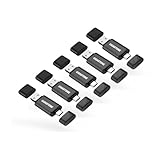
The GIGASTONE five-pack is the best overall choice in this roundup because it is the only entry that removes both major compromises at once. USB 3.2 Gen 1 with speeds rated up to 100MB/s fixes the transfer-time problem that affects every USB 2.0 drive here, and dual USB-C and USB-A connectors on each drive remove the adapter problem entirely. Five 64GB drives means you get working, backup and handout copies without buying twice.
Key specifications
- Capacity: 5 × 64GB, approximately 320GB combined, around 59.6GiB usable per drive
- Interface: USB 3.2 Gen 1 (5Gbps signalling), rated up to 100MB/s — several times the real-world throughput of USB 2.0 drives in this list
- Connectors: 2-in-1 USB-C and USB-A on each drive
- Design: head cap design protecting the connector in transit
- Practical capacity per drive: roughly 15,000 photos, or about 16 hours of 1080p video
The speed difference is not marginal. Writing 60GB to a USB 2.0 drive at roughly 10MB/s takes about 100 minutes; at a rated 100MB/s the same job takes around ten. Over a year of regular transfers that is the difference between using a thumb drive and avoiding it. The dual connector means the same drive plugs into a USB-C laptop, a USB-A desktop, and a phone with OTG support, with no adapter to bend or lose, and the head cap protects the connector when the drive is in a bag.
Pros
- USB 3.2 Gen 1 rated up to 100MB/s — by far the fastest class in this roundup
- Native USB-C and USB-A on every drive, no adapters
- Five 64GB drives cover working, backup and handout roles
- Head cap design protects the connector in transit
Cons
- Premium tier pricing for the pack
- Speed ratings assume a USB 3.x host port; on a USB 2.0 port the drive falls back to slow speeds
- Caps can still be lost, unlike a swivel design
- No hardware encryption built in
The closest alternatives are the RAOYI 64GB five-pack and the WesData 64GB five-pack with adapters. RAOYI matches the capacity and count but stays on USB 2.0, so it is the choice only if you write once and read rarely. WesData gives you USB-C access through adapters rather than native connectors, which works but adds a failure point. GIGASTONE wins on the two things that determine whether you enjoy using a drive: how fast it moves files, and whether it plugs into whatever you are holding without extra parts.
How to Choose
Choosing a thumb drive comes down to four decisions made in order: interface, connector, capacity, and physical design. Get the first two right and the rest is easy. Get them wrong and you will end up buying a second drive within a month.
Step 1: Decide whether you need USB 3.x or whether USB 2.0 is enough
This is the single biggest factor in how a drive feels to use. USB 2.0 Hi-Speed signals at 480Mbps, which works out to a theoretical 60MB/s, but real USB 2.0 flash drives in this segment typically deliver roughly 15–30MB/s sequential reads and 5–12MB/s writes