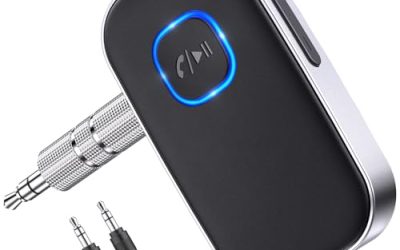
Our Short List of 3

- Best for: Tight or visible USB ports where a larger dongle would stick out or get knocked.
- Converts factory wired CarPlay and wired Android Auto to wireless
- 2-in-1 design for iPhone and Android phones
- Dual-band Wi-Fi, 2.4GHz and 5GHz
- Bluetooth 5.0

- Best for: Drivers who prefer a long-established 2-in-1 adapter with clearly stated compatibility.
- Converts factory wired CarPlay and wired Android Auto to wireless
- 2-in-1 design, model CPC200-CP2A
- 5GHz WiFi with seamless auto-connect
- Online OTA upgrade support

- Best for: Cars where every driver uses an iPhone and no Android support is needed.
- Converts factory wired CarPlay to wireless CarPlay
- CarPlay-only design for iPhone
- 5GHz WiFi connection
- Startup time of about 7 seconds
All 4 Picks at a Glance
| Product | Specs | Action |
|---|---|---|
| OTTOCAST Mini Slim |
| Check price on Amazon |
| Carlinkit 4.0 (CPC200-CP2A) |
| Check price on Amazon |
| OTTOCAST U2-AIR |
| Check price on Amazon |
 Carlinkit Mini Ultra 3 |
| Check price on Amazon |
Key takeaways
- Cut the cable without losing CarPlay. Compare five wireless adapters that turn factory wired CarPlay into a wireless connection.
Buying a wireless CarPlay adapter is really a compatibility decision before it is a shopping decision. These small dongles do not add CarPlay to a car that never had it; they take the wired CarPlay your car already offers and turn it into a wireless link, so your phone stays in your pocket while maps, calls, and music still appear on the dashboard screen. Get the compatibility question wrong and the adapter simply will not connect, no matter how well it is built.
This guide is for iPhone drivers who are tired of plugging in for every short trip, for households where an iPhone and an Android phone take turns behind the wheel, and for owners of shared family cars where two drivers need the screen to switch between phones without fuss. Every adapter below was chosen from the names and specifications shown on its Amazon product page, with attention to which phones it supports, how it connects, and how it fits around the USB port.
Quick Picks
As an Amazon Associate we earn from qualifying purchases
| Product | Best for | Key spec from title |
|---|---|---|
| Carlinkit 5.0 (2air) | A household mixing iPhone and Android phones | 2-in-1 wireless CarPlay and Android Auto adapter |
| OTTOCAST Mini Slim | A USB port buried in a tight console cubby | Ultra-compact 2-in-1 adapter with dual-band Wi-Fi |
| Carlinkit 4.0 (CPC200-CP2A) | Drivers who want a long-established 2-in-1 adapter | 2-in-1 wireless adapter with 5GHz WiFi and auto-connect |
| OTTOCAST U2-AIR | An iPhone-only car where simplicity matters | CarPlay-only wireless adapter with fast startup |
| Carlinkit Mini Ultra 3 | A near-invisible dongle on a newer car | Round mini 2-in-1 adapter with USB-A and Type-C |
How to Choose
Check your car has factory wired CarPlay first
Every adapter in this guide only works in a car that already has factory wired CarPlay, and some also need factory wired Android Auto for the Android side. Plug your phone in with a cable first: if CarPlay appears on the screen, the car qualifies. If it never appears, no adapter will create it. Also confirm which USB port triggers CarPlay, because many cars have several ports and only one carries data. Charging-only ports, often marked with a battery symbol, will power the dongle without ever launching CarPlay, which is the most common reason a first setup seems to fail.
Match the adapter to the phones in the car
A CarPlay-only adapter is fine when every driver uses an iPhone, and it keeps setup simple because there is only one system to configure. Households that mix iPhone and Android need a 2-in-1 adapter instead, so the same dongle can serve whichever phone is in the car. Check the phone requirements on the listing as well: most adapters here support iPhone 6 or newer with iOS 10 and above, and Android phones running Android 11 or newer for the Android Auto side. An older phone that falls below those floors will pair over Bluetooth and then fail to hand over to the wireless display.
Think about where the USB port sits
USB ports live in awkward places: deep in a center console, under a sliding cover, or on a vertical face where a long dongle sticks out and gets knocked by knees or coffee cups. A stick-shaped adapter suits a deep console where it can lie flat and disappear. A round mini adapter suits a shallow or visible port, since it barely extends past the socket. If the port is recessed, measure the clearance around it before ordering, and check whether the listing includes both USB-A and USB-C cables or adapters, because the wrong connector turns a five-minute install into a return.
Look at reconnection speed and update support
The difference between a good adapter and an annoying one shows up on the second drive, not the first. After the initial pairing, the adapter should reconnect on its own within seconds of starting the car, without asking you to open settings or tap anything. Listings that state an auto-connect time give you something concrete to compare. Firmware updates matter too: car software changes, phone software changes, and an adapter with online updates can be patched when a new phone update breaks the handshake. Adapters without any update path tend to age badly after a major iOS release.
The 5 Best Options
Carlinkit 5.0 (2air)
The Carlinkit 5.0 is the adapter to pick when the car serves more than one phone platform. It converts both wired CarPlay and wired Android Auto to wireless, so an iPhone driver on Monday and an Android driver on Tuesday each get a cable-free connection from the same dongle. Its dual-band Wi-Fi and stated ten-second auto-connect keep the handoff quick after the first pairing, and online firmware updates give it a way to stay working as phones change. At 76 x 43 x 12.3 mm it is a slim stick that lies flat in a console.
Specs
- Converts factory wired CarPlay and wired Android Auto to wireless
- 2-in-1 design for iPhone and Android phones
- Dual-band Wi-Fi connection
- Auto-connects in about 10 seconds after first pairing
- Online firmware updates
- Dimensions: 76 x 43 x 12.3 mm
Best for: Households where iPhone and Android phones share one car.
Watch out for: Confirm your car has factory wired CarPlay or wired Android Auto first, since the adapter cannot add either system to a car that lacks it.
OTTOCAST Mini Slim
- Best for: Tight or visible USB ports where a larger dongle would stick out or get knocked.
- Converts factory wired CarPlay and wired Android Auto to wireless
- 2-in-1 design for iPhone and Android phones
- Dual-band Wi-Fi, 2.4GHz and 5GHz
- Bluetooth 5.0
Tight or visible USB ports where a larger dongle would stick out or get knocked.
The listing notes it is not compatible with BMW or Tesla models, so check the exclusion list against your car before ordering.
The OTTOCAST Mini Slim earns its place through sheer smallness. Measuring 20.7 x 20.7 x 23.5 mm and weighing 30 g, it is barely larger than the USB plug itself, which makes it the natural choice for a shallow console cubby or a port on a visible dashboard face. Despite the size it is a full 2-in-1 adapter, converting wired CarPlay and wired Android Auto to wireless, with dual-band Wi-Fi and Bluetooth 5.0. It remembers up to two phones and reconnects to the last paired device within five to eight seconds of starting the engine.
Watch out for: The listing notes it is not compatible with BMW or Tesla models, so check the exclusion list against your car before ordering.
Carlinkit 4.0 (CPC200-CP2A)
- Best for: Drivers who prefer a long-established 2-in-1 adapter with clearly stated compatibility.
- Converts factory wired CarPlay and wired Android Auto to wireless
- 2-in-1 design, model CPC200-CP2A
- 5GHz WiFi with seamless auto-connect
- Online OTA upgrade support
Drivers who prefer a long-established 2-in-1 adapter with clearly stated compatibility.
The listing directs some cars elsewhere, including certain BMW, Nissan, Volvo, and Mitsubishi models, so verify your exact car against the listing before buying.
The Carlinkit 4.0, model CPC200-CP2A, is the established option in this group, with a long sales history behind it and a listing that spells out its compatibility in plain terms. It is a 2-in-1 adapter that turns factory wired CarPlay and wired Android Auto into wireless connections, using 5GHz WiFi for the data link and reconnecting automatically once paired. The listing states support for more than 600 car models from 2017 to 2025, plus iPhone 6 and above and Android 11 and above. USB-A and USB-C cables come in the box, and online upgrades keep the firmware current.
Watch out for: The listing directs some cars elsewhere, including certain BMW, Nissan, Volvo, and Mitsubishi models, so verify your exact car against the listing before buying.
OTTOCAST U2-AIR
- Best for: Cars where every driver uses an iPhone and no Android support is needed.
- Converts factory wired CarPlay to wireless CarPlay
- CarPlay-only design for iPhone
- 5GHz WiFi connection
- Startup time of about 7 seconds
Cars where every driver uses an iPhone and no Android support is needed.
It handles CarPlay only, so an Android phone in the same car will still need a cable or a different adapter.
The OTTOCAST U2-AIR is the straightforward pick for an iPhone-only car. It does one job, converting wired CarPlay to wireless, and does not ask you to configure an Android side you will never use. The listing describes a startup time of about seven seconds, a 5GHz Wi-Fi link, and plug-and-play setup with online updates. Its compact body measures 2.2 x 0.6 x 2.2 inches, small enough to sit unnoticed in most consoles. For a driver whose household runs entirely on iPhones, the single-purpose design is a feature rather than a limitation.
Watch out for: It handles CarPlay only, so an Android phone in the same car will still need a cable or a different adapter.
Carlinkit Mini Ultra 3
- Best for: Drivers who want the smallest current-generation 2-in-1 adapter on a newer car.
- Converts factory wired CarPlay and wired Android Auto to wireless
- 2-in-1 design for iPhone and Android phones
- Round mini body, about 25 mm across
- USB-A and Type-C plug-and-play connection
Drivers who want the smallest current-generation 2-in-1 adapter on a newer car.
This is a newer model with a thinner published record than the Carlinkit 4.0, so check the listing for your exact car model before ordering.
The Carlinkit Mini Ultra 3 is the newest small-form adapter here, built around a round body roughly 25 mm across that sits almost flush with the USB port. It is a 2-in-1 adapter that converts wired CarPlay and wired Android Auto to wireless, with USB-A and Type-C connections so it fits either port style without a separate purchase. The listing promises plug-and-play setup, fast connection, and online upgrades, and the design keeps original car controls working, including touch, steering-wheel buttons, and voice assistants. It suits drivers who want the current generation of mini adapter and accept a shorter track record.
Watch out for: This is a newer model with a thinner published record than the Carlinkit 4.0, so check the listing for your exact car model before ordering.
Which One Fits Your Situation
You share the car with an Android user
Pick the Carlinkit 5.0. Its 2-in-1 design converts both wired CarPlay and wired Android Auto to wireless, so whichever phone is in the car connects without swapping hardware. The ten-second auto-connect and dual-band Wi-Fi keep the daily handoff smooth, and the slim stick shape hides easily in a console.
Your USB port is buried in a tight console
Pick the OTTOCAST Mini Slim. At 20.7 x 20.7 x 23.5 mm it is barely bigger than the plug itself, so it fits shallow cubbies and visible ports where longer dongles stick out. It still covers both phone platforms, and it remembers two phones for a shared car.
Every phone in the house is an iPhone
Pick the OTTOCAST U2-AIR. A CarPlay-only adapter keeps setup to a single system, and its seven-second startup gets CarPlay on screen quickly. There is no Android side to configure or pay for, and the compact body stays out of the way.
You want the longest track record
Pick the Carlinkit 4.0. Model CPC200-CP2A has been sold for years, the listing states compatibility with more than 600 car models, and both cables come in the box. If the Mini Ultra 3 appeals but its short history worries you, the 4.0 is the safer version of the same idea.
Common Mistakes
- Buying an adapter for a car that never had wired CarPlay, expecting the dongle to add it.
- Plugging the adapter into a charging-only USB port instead of the car’s data port, then assuming the adapter is broken.
- Choosing a CarPlay-only adapter for a household that also drives with Android phones.
- Ignoring the listing’s exclusion list, especially for BMW, Tesla, and certain Volvo or Nissan models.
- Forgetting to check whether the car needs a USB-A or USB-C connection before ordering.
Frequently Asked Questions
Will a wireless CarPlay adapter work in any car?
No. These adapters only work in cars that already have factory wired CarPlay, and 2-in-1 models also need factory wired Android Auto for the Android side. Test with a cable first: if CarPlay appears on the screen when plugged in, an adapter can make that connection wireless. If it never appears, the adapter cannot help.
Do I need to pair the adapter every time I drive?
No, pairing happens once during setup. After that, the adapter should reconnect to your phone automatically within seconds of starting the car, as long as Bluetooth and Wi-Fi are switched on. If it asks you to pair again, check that the phone has not forgotten the adapter after a software update.
Can two phones share one adapter?
Some adapters remember two phones, including the OTTOCAST Mini Slim, which reconnects to the last paired device. In practice the car connects to whichever remembered phone is present, so a shared car works best when only one driver’s phone is in range at a time. A passenger’s phone can sometimes grab the connection first.
Why does my adapter disconnect or lag?
Wireless CarPlay sends audio, maps, and calls over Wi-Fi, so interference from other devices can cause dropouts, especially in dense traffic or parking garages. A dual-band adapter can help by using the 5GHz band. Also check for a firmware update on the adapter and a pending phone update, since mismatched software is a common cause of new connection problems.
More from Amazon
Programs that pair well with the guide above. Offers and eligibility are set by Amazon and may change.
Free shipping on eligible items, Prime Video and more. Eligible new members can start with a free trial.
Start a Prime free trialAudiobooks and podcasts to listen to on the go. Eligible new members can start with a free trial.
Try Audible freeAd-free music streaming. Eligible new subscribers can start with a free trial.
Try Music Unlimited freeA free business account with business pricing and bulk-buying tools for work, shop or home office.
Create a business accountAs an Amazon Associate we earn from qualifying purchases.