What a wireless CarPlay adapter does
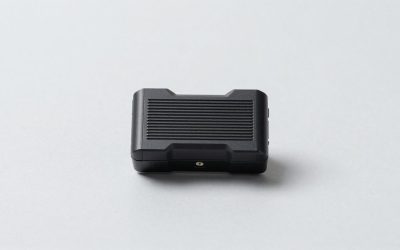
A wireless CarPlay adapter plugs into the USB port your iPhone currently uses for wired CarPlay. It connects to the phone over Bluetooth and Wi-Fi, so CarPlay starts without a cable on later drives. The adapter doesn’t add CarPlay to a car that lacks it, and it won’t turn Android Auto into CarPlay.
Compatibility is the first hurdle: your car must already support wired Apple CarPlay through that port. Check the car’s manual or test with a wired iPhone before shopping. USB ports used only for charging won’t work, and some vehicles have more than one port but support CarPlay through only one.
Quick picks
| Option | Best for | Main trade-off |
|---|---|---|
| Basic plug-in adapter | Most drivers with wired CarPlay who want fewer cables | May take several seconds to connect; compatibility varies |
| Adapter with a longer cable or extension | Cars with awkwardly placed USB ports | More cable to tuck away; added connections can be troublesome |
| Keep using wired CarPlay | Drivers who prioritize reliability or don’t mind plugging in | Requires a cable every trip |
Choosing an adapter
For a typical setup, look for a wireless CarPlay adapter that explicitly lists your car’s year, make, and model, or provides a clear compatibility checker. Broad claims like “works with all cars” aren’t enough: adapters can behave differently with different head units, even when the vehicle has factory wired CarPlay.
Check the return window and the seller’s update and support process before buying. Firmware updates may fix connection problems, but an update isn’t guaranteed to help—and a confusing update process can be a headache. Avoid paying extra for claims about faster performance unless reviews or return terms give you a practical way to judge it.
Some adapters connect directly to the car’s USB port; others include a short lead or extension. If your port is deep in a console, a wireless adapter with a USB extension can make installation tidier. It still needs to stay plugged into the correct CarPlay data port. An extension can also add another point of failure, so it’s not a performance upgrade by itself.
Trade-offs and common problems
Wireless CarPlay is convenient, not identical to a wired connection. Initial pairing can take longer than plugging in a cable, and there can be a brief delay before the car’s screen appears. Calls, maps, and music usually work as they do in CarPlay, but an adapter adds another device and connection between the phone and the car.
Common failure modes include the adapter not reconnecting after a restart, intermittent audio, laggy controls, or a phone that keeps connecting to the car’s Bluetooth instead of the adapter. A forgotten pairing, a low-quality USB port, or interference can be involved. Start troubleshooting by restarting the phone and head unit, checking that the adapter is in the CarPlay port, and removing duplicate Bluetooth pairings. Follow the adapter maker’s reset instructions before changing the car’s settings.
Wireless CarPlay also uses the phone’s Wi-Fi and Bluetooth connections and may use more battery than a wired session. If you take long drives, keep a charging cable handy. Some cars can charge from the same port the adapter occupies, while others have a separate charging port; check before assuming the adapter will keep your phone powered.
If your car’s infotainment system already takes a long time to start, an adapter can add to the wait. Drivers who need CarPlay immediately for short trips may find wired use less irritating. And if you rarely drive or already have a cable within reach, there may be little reason to buy anything.
Who should buy one?
A wireless adapter makes sense if you use CarPlay most days, find plugging in annoying, and are comfortable troubleshooting a small electronic accessory. It’s especially handy when the USB port is easy to reach and your car has a reliable wired CarPlay connection to begin with.
Keep the cable if you depend on CarPlay for work calls, want the fewest possible connection variables, or have had trouble with Bluetooth accessories in this car. Wired CarPlay is often the better no-cost choice: it avoids adapter pairing and can charge the phone while connected. If you do buy, treat the first week as a test. Try different start-up routines, calls, and navigation, and return it promptly if it repeatedly fails to reconnect.
FAQ
Will a wireless CarPlay adapter work in any car?
No. The car must already have factory wired Apple CarPlay on the USB port you use. Confirm compatibility for your specific vehicle before ordering.
Does the adapter work with Android phones?
Not necessarily. A CarPlay-only adapter is intended for iPhone. Some products support Android Auto too, but check the product’s compatibility details rather than assuming.
Can I still charge my phone?
Usually, but the adapter occupies a USB port. Use a separate charging port or a suitable charging setup if your car has one; don’t assume every USB splitter will preserve CarPlay data.
Is wireless CarPlay as reliable as wired?
It can work well, but it adds a wireless connection and another device that can fail or need resetting. For maximum consistency, keep using a cable.