Key takeaways
- Best Overall: Nulaxy Full Aluminum Dual Folding Stand – height and angle adjustable, portable, anti-slip base
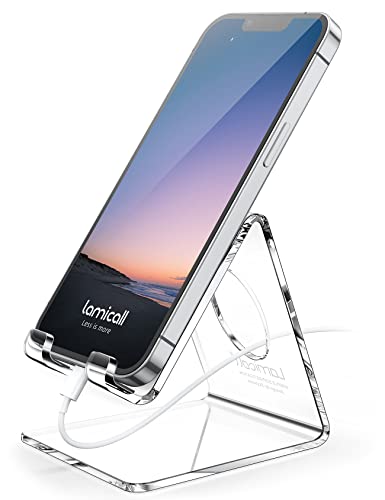
- Best Budget Foldable: Lamicall Cell Phone Stand for Desk – foldable, height and angle adjustable
- Best for Charging: OMOTON C2 Adjustable Aluminum Stand – charging cutout and 3mm base
- Best Sturdy Stand: COOPER ChatStand – weighted metal base for calls and recording
- Best Overhead Arm: LISEN Cell Phone Holder for Bed and Desk – gooseneck magic arm for hands-free viewing
- Best Tripod Stand: eucos 62-inch Phone Tripod – extendable stand with remote
The best type of cell phone stand for most people is a foldable, height-adjustable aluminum desk stand, and the Nulaxy Full Aluminum Dual Folding Stand is our top pick of that style: it adjusts in both height and angle, has an anti-slip base and folds flat for a bag or glove box. The runner-up, the OMOTON C2, is the better choice if you charge while you watch, because its base includes a charging-cable cutout. Beyond those two, the right stand depends on what you use it for: video calls, recipes, bedside viewing, filming, or following a map on a break between drives.
This guide is organized by stand type, not by brand. We compare six main picks that each represent a distinct type, covering folding desk stands, charging-friendly stands, weighted-base stands, overhead gooseneck arms and extendable tripods, plus four alternatives. It is written for drivers, remote workers and mobile professionals who use a phone away from a proper desk: in a van between jobs, a hotel room, a workshop or a home office. We explain angle, weight, stability and compatibility so that you pick the type first and the model second.
Our top picks


As an Amazon Associate we earn from qualifying purchases at no extra cost to you.
Top Picks at a Glance
- Best Overall: Nulaxy Full Aluminum Dual Folding Stand – height and angle adjustable, portable, anti-slip base
- Best Budget Foldable: Lamicall Cell Phone Stand for Desk – foldable, height and angle adjustable
- Best for Charging: OMOTON C2 Adjustable Aluminum Stand – charging cutout and 3mm base
- Best Sturdy Stand: COOPER ChatStand – weighted metal base for calls and recording
- Best Overhead Arm: LISEN Cell Phone Holder for Bed and Desk – gooseneck magic arm for hands-free viewing
- Best Tripod Stand: eucos 62-inch Phone Tripod – extendable stand with remote
Comparison Table
Each pick represents a different type of stand. Specs come from listing text; items not stated are marked “not listed”.
| Product | Best for | Key specs | Watch for | Price tier |
|---|---|---|---|---|
| Nulaxy Dual Folding | Folding desk stand | Aluminum; height and angle adjustable; anti-slip base | Fixed base footprint | Budget |
| Lamicall Foldable | Light travel stand | Foldable; height and angle adjustable; 4 to 8 in phones (listing) | Not for large tablets | Budget |
| OMOTON C2 | Charging while viewing | Aluminum; charging cutout; 3mm sturdy base | Not foldable (listing) | Budget |
| COOPER ChatStand | Calls and recording | Weighted metal base; 9 to 13 in adjustable (listing) | Heavier to carry | Mid-range |
| LISEN Overhead Holder | Bed, desk or kitchen | Gooseneck magic arm; overhead recording position | Needs a clamp surface | Mid-range |
| eucos 62-inch Tripod | Filming and video calls | Extendable up to 62 in; remote included | Bulkier to store | Mid-range |
1. Nulaxy Full Aluminum Dual Folding Stand: Best folding desk stand
- Full aluminum construction
- Height and angle adjustable with dual folding arms
- Anti-slip base
- Fits most phone cases up to about 18mm thick (per listing text)
- Works with small tablets and handheld game consoles (listing)
Best for: Remote workers and drivers who want one stand that works at a desk, in a van or in a hotel room.
Skip if: you need to charge from underneath with a cable that does not fit around the arm, or you want a weighted base.
The dual folding design is the key to this type of stand. Two hinges let you set both the height of the support and the angle of the phone, so you can lift the screen to eye level on a desk or lay it low for a quick glance. Aluminum is stiff enough that the stand does not flex under a phone, which is the usual failing of plastic ones.
The anti-slip base grips smooth surfaces, which matters on a dashboard-height tray or a table that shakes when you type. The foldable form factor means it goes into a jacket pocket, a glove box or a laptop bag without bulk.
Case thickness is the compatibility detail to check. A rugged case with a battery pack may exceed the stated thickness limit, so choose a stand rated for your case, not just your phone. The same brand sells multi-pack versions if you want one for home and one for the road.
Pros
- Adjustable in height and angle
- Sturdy metal build
- Folds flat
- Anti-slip base
Cons
- Case thickness limit
- Charging cable routing can be awkward
- Not designed for large tablets
2. Lamicall Cell Phone Stand for Desk: Best budget foldable
- Foldable and portable
- Height and angle adjustable
- Compatible with 4 to 8 inch phones with a case, iPad mini, Nintendo Switch and e-readers (listing)
- Anti-slip silicone pads on the backrest, hooks and feet (maker listing)
- Material: not listed in the title
Best for: Anyone after a low-cost, light stand for travel or an office drawer.
Skip if: you need a very stable base for typing on the same surface or for a large tablet.
Lamicall sells a range of stands, from heavy bases to ultra-thin folders, so check the exact model. The one covered here is the foldable adjustable type, which suits travel. It is small enough to carry in a pocket and set up within seconds.
Silicone pads at the contact points protect your phone from scratches and keep it from sliding, a practical detail when you tilt the stand to a steep angle.
The trade-off of lightweight stands is that they can tip if the table is bumped. Keep cables loose enough so that a tug does not pull the phone off.
Pros
- Low cost
- Pocket size
- Protective pads
- Works with small tablets
Cons
- Lighter base
- Limited to smaller devices
- Several variants to choose between
3. OMOTON C2 Adjustable Aluminum Stand: Best for charging while viewing
- Aluminum body with a 3mm sturdy base
- Charging cutout so a cable can pass through
- Non-slip silicone pad
- Adjustable viewing angle
- Foldability: not listed (design is a fixed stand)
Best for: People who leave the phone on a desk or tray plugged in all day.
Skip if: you need a stand that folds flat for travel.
Charging while viewing is the use case this type of stand was made for. The cutout in the base lets a cable run under or around the phone without blocking the port, which avoids the awkward cable bend that wears out connectors.
A thick metal base is steadier than a thin folding arm, so the stand does not rock when you tap the screen. Pair it with a case thin enough to fit the cradle.
Because it does not fold, the OMOTON is a desk-based choice. Keep it on a workbench, nightstand or the dash tray of a parked vehicle, not in a pocket.
Pros
- Cable cutout
- Stable base
- Simple design
Cons
- Not foldable
- Fixed footprint
- Case fit varies
4. COOPER ChatStand: Best sturdy stand
- Weighted metal base
- Adjustable for 9 to 13 inch devices (listing)
- Designed for video calls and recording
- Sturdy construction (listing)
- Weight: not listed in the title
Best for: People who take lots of video calls or record content from a fixed spot.
Skip if: you want a stand to carry daily or you only need a small phone holder.
A weighted base is the main difference between a good stand and a great one. A heavy base stops wobble when you tap, and holds up a bigger device without tipping. The ChatStand is designed with video calls in mind, so the angle holds steady.
The stated 9 to 13 inch adjustment range suggests it works with tablets as well as phones, though you should check the product page for your device size.
The trade-off is portability. It is a desk stand, not a pocket stand. If you need a weighty base only at one location, this is a good place to put it.
Pros
- Weighted base
- Works with phones and tablets (as listed)
- Very stable
Cons
- Heavy
- Not a travel stand
- Higher cost
5. LISEN Overhead Cell Phone Holder: Best overhead arm
- Gooseneck magic arm
- Clamp for bed or desk mounting
- Overhead recording and viewing position
- Hands-free viewing
- Maximum phone size and arm length: not listed in the title
Best for: Bedside viewing, recipes in the kitchen, and overhead filming of crafts or repairs.
Skip if: you have no edge to clamp onto or you want a stand that sits on a flat surface.
Overhead arms solve a problem table stands cannot: they hold the phone above you. That suits lying in bed, working on a bench or filming from above. The gooseneck allows you to aim the phone precisely and then lock it in place.
Clamp strength and arm stiffness are the two things to consider. A long arm with a heavy phone can droop, so choose a model with a stated rating, or keep the arm short.
Clamp onto a stable surface that can handle the load. A loose clamp can drop a phone onto your face, so tighten it fully.
Pros
- Hands-free overhead position
- Adjustable
- Clamp attaches to many surfaces
Cons
- Can droop with heavy phones
- Needs a clamp surface
- Not portable on its own
6. eucos 62-inch Phone Tripod: Best tripod stand
- Extendable up to 62 inches
- Remote control included
- Doubles as a selfie stick (listing)
- Compatible with iPhone and other phones
- Weight and folded length: not listed in the title
Best for: Filming, group calls and standing videos in a van or at a job site.
Skip if: you only need a desk stand; a tripod takes more space.
Tripods extend the idea of a stand to the floor. At 62 inches, the phone can sit at eye level when standing, which is more flattering for video calls and easier for hands-free navigation if you set up in a parked vehicle.
The remote lets you start and stop recording without touching the phone, handy for steady footage. Make sure the legs are fully spread and the surface is level.
Tripods are bulkier than desk stands. If you carry one daily, expect it to occupy bag space. For occasional use it is a flexible option.
Pros
- Tall adjustable height
- Remote included
- Good for video
Cons
- Bulkier
- Not a quick desk stand
- Light tripods can tip in wind
Also Consider
UGREEN Foldable Phone Stand
A well-known budget folding aluminum-style stand. A solid alternative to the Nulaxy if stock is limited.
Lamicall 360-degree Rotation Stand
Adds rotation for landscape and portrait switching. Useful for video and recipes.
Lamicall Ultra-Thin Foldable Stand
A slim fold designed for wallets and pockets. Choose it if you carry it everywhere.
MAGIPEA Gooseneck Holder
A 30-inch flexible clamp-on arm similar to the LISEN. Worth considering for a longer reach.
How We Chose
This guide is research-based. We compared listing text, the makers’ product pages and independent information on phone stand design. We did not personally use these products, and we do not claim durability findings from our own use.
We chose products that represent different stand types so you can decide the type first. We kept to at most two per brand and noted details missing from the listing as “not listed”. Price tiers are relative only.
Buying Guide
Choose the type first
There are five common types. Folding desk stands are portable and adjustable. Fixed-base stands with charging cutouts suit all-day desk use. Weighted stands are for calls and recording. Gooseneck arms hold the phone overhead. Tripods stand on the floor and give you height.
Most people need one main stand and maybe a second for travel. Decide where you will use it and the type usually follows.
Angle and height
Look for a stand that adjusts in both directions. A pivoting hinge at the base plus a second at the arm gives the best range. Eye-level viewing reduces neck strain, so a stand that lifts the screen a few inches above the desk is better than one that lays it flat.
If you take video calls, aim to place the camera near eye level. A low camera angle can be unflattering and tires your neck.
Stability and weight
A stand is only as good as its base. A wide, heavy or grippy base resists tipping when you tap the screen. Aluminum folding stands are stable for phones but can slide on glossy surfaces, so check for silicone feet.
Weighted stands are best for tablets. For a phone on a moving vehicle tray, a light stand with grip is better than a heavy one that could slide.
Compatibility
Check the stated device size range, usually 4 to 8 inches for phones and larger for tablets. Check the case thickness limit, because rugged cases often exceed it. Check the cable cutout if you charge while using the stand.
If your phone has a magnetic ring or battery pack on the back, it may affect how it sits. Look for stands with a deep cradle or a flat backrest.
Safe use in vehicles
If you use a stand in a vehicle, only do it when parked, and follow your local laws on phone use while driving. Do not use a desk stand on a moving dashboard, and keep cables from interfering with driving controls.
For a stand in a parked van or truck cab, use grip pads, and remove the stand from a hot dash in summer.
Which type fits which job
For video calls, the camera should sit near eye level, so a tall tripod or an adjustable weighted stand is best; a flat folding stand puts the camera low and looks at you from below. For reading recipes or manuals in a workshop or kitchen, a foldable stand with a steep angle keeps the screen out of splashes and at a readable distance. For watching video in bed, only an overhead arm or a very stable stand on a tray works properly.
For navigation in a parked vehicle, such as checking a route before you set off, a small foldable stand on the passenger seat or tray is enough. Never place a stand where it blocks your view or airbags, and do not adjust it while driving.
For working across devices, a stand next to a laptop turns the phone into a second screen for messages and calls. In that case a charging cutout is more valuable than any other feature, because the phone will sit there for hours.
Materials: aluminum, plastic and silicone
Aluminum is stiff, dissipates heat and looks tidy; it is the common choice for folding stands. Plastic is lighter and cheaper but can flex and crack at hinges. Silicone pads protect the phone and grip the surface. Check that pads are replaceable or at least firmly attached, because they are the first part to wear.
Weight matters for the base but not for the arm. A heavy base with a thin arm is the ideal combination, which is why weighted desk stands feel steadier than their size suggests.
Common Mistakes to Avoid
- Buying a stand without checking case thickness.
- Using a lightweight stand with a large tablet.
- Choosing a fixed stand when you need to travel.
- Ignoring the cable path when charging.
- Clamping an overhead arm onto a loose surface.
- Using any phone stand while driving.
Frequently Asked Questions
What are the best types of cell phone stands?
The main types are folding desk stands, fixed charging stands, weighted base stands, gooseneck arms and tripods. A folding aluminum stand such as the Nulaxy is the best all-round choice.
Which phone stand is best for video calls?
A stable stand with an adjustable height, like the COOPER ChatStand or a tripod, helps keep the camera at eye level.
Can I charge my phone while it is on a stand?
Yes, if the stand has a cable cutout or leaves the charging port clear, as the OMOTON C2 does.
Do phone stands work with thick cases?
Only if the stand’s stated case thickness limit covers your case. Check the listing for the limit.
Are foldable phone stands sturdy?
Aluminum folding stands are sturdy for phones, but lightweight ones can slide on slick surfaces. Look for anti-slip pads.
Is a gooseneck holder better than a desk stand?
It is better for overhead or bedside viewing. A desk stand is simpler and more stable on a flat surface.
Can I use a phone stand in my car?
Only when parked, and follow local laws. Many desk stands are not designed for moving vehicles.
Which One Should You Buy?
Pick the Nulaxy for a stand that works everywhere, the Lamicall for the lowest cost, the OMOTON if you charge while viewing, the COOPER for calls and recording, the LISEN for hands-free overhead viewing, and the eucos tripod for filming at height.
Decide where you will use it, check case thickness and cable access, and the right type will be obvious.
A few practical rules of thumb help. If you will carry the stand in a pocket or bag every day, stay with a folding aluminum model: it weighs very little and has no loose parts. If you leave it at a desk, a heavier fixed base is worth the extra mass because it will not move when you press the screen. If you film or record, a tripod or weighted base provides the steadiness that a thin folding stand cannot, and if you read or watch lying down, the overhead arm is the only type that really works without bending your neck.
Cleaning and care are minimal. Wipe the silicone pads occasionally so they stay grippy, and check hinges for looseness after a few months of daily folding. If a hinge starts to droop, do not force it; replace the stand. Keep phone stands away from direct summer sun in a parked vehicle, because a very hot metal stand can warm the phone and a plastic one can warp. And always check that the phone is fully seated in the cradle before you let go, particularly with heavier phones and thick cases.
Finally, think about what else sits on the surface. A desk stand with a small footprint leaves room for a keyboard, notebook and coffee, while a wide weighted base may crowd a compact desk or van tray. Measure the free space before you choose, and if the area is tight, an overhead arm clamped to the edge uses no surface area at all.
If you are still undecided between two types, ask which problem annoys you most today. If your phone keeps sliding or falling flat, you need a grippier or heavier base. If your neck hurts from looking down, you need a taller stand or an overhead arm. If your charger cable is always in the way, you need a cutout. If you keep forgetting to bring the stand, you need a folder small enough to live in your bag. Solving the biggest annoyance first usually gives better results than hunting for a long feature list, and a second, cheaper stand for a different spot is often the smartest extra purchase.
Sources
- Nulaxy and Lamicall product listings and maker pages
- OMOTON, COOPER and LISEN product listing details
- eucos phone tripod product listing
- General guidance on ergonomic screen height from workplace safety organizations
Last updated: October 2026