Key takeaways
- Our Nextbase 622GW dash cam review covers 4K video, image stabilisation, what3words, Emergency SOS and Alexa to help you decide if it fits your car.
As an Amazon Associate we earn from qualifying purchases
The Nextbase 622GW sits at the top of the brand’s Series 2 range, and it is built for drivers who want the clearest possible front-facing footage plus a layer of safety features that most dash cams skip. This nextbase 622gw dash cam review looks at what the camera actually offers on paper: true 4K recording, digital image stabilisation, a polarising filter, 10 Hz GPS with what3words location pinpointing, Emergency SOS alerts and built-in Alexa, all in a single front camera with a 3-inch touchscreen.
It is aimed at commuters, long-distance drivers and anyone who has had a near miss and wished the footage had been sharper. It is not a budget camera, and it is front-only out of the box, so this review also covers where its limits sit and who should look elsewhere.
Nextbase 622GW Dash Cam Review: The Short Version
The 622GW records in 4K at 30 frames per second through a 140-degree, six-layer f/1.3 lens. If you prefer smoother motion over maximum resolution, it can step down to 1440p at 60 frames per second, and it offers a super slow motion mode at 1080p and 120 frames per second for picking apart fast-moving incidents. Digital image stabilisation smooths out vibration, an integrated polarising filter cuts windscreen reflections, and Enhanced Night Vision is tuned for low-light driving.
Around that core camera, Nextbase adds features few rivals bundle together: Emergency SOS that can alert emergency services if you are unresponsive after a crash, what3words integration that can share your location in a 3-metre square, Alexa voice control, Intelligent Parking Mode, and support for click-in rear and cabin camera modules if you want to expand coverage later.
Quick Picks
| Product | Best for | Key spec |
|---|---|---|
| Nextbase 622GW | Drivers who want flagship 4K front footage and crash-safety features in one unit | 4K at 30fps, 140° f/1.3 lens, 3-inch touchscreen, 10 Hz GPS |
How to Choose
Resolution and frame rate trade-offs
Resolution decides how much detail survives in a clip: number plates, road signs and the sequence of a collision. The 622GW gives you three meaningful modes. The 4K setting at 30 frames per second captures the most detail per frame, which matters when you need to zoom into a plate. The 1440p setting at 60 frames per second doubles the frame rate, so fast lateral movement looks smoother. The 1080p setting at 120 frames per second is a super slow motion mode intended for reviewing brief moments in detail rather than everyday recording. Choosing between them is about whether your driving is mostly urban stop-start traffic, where 4K detail helps, or faster roads, where frame rate can matter more.
Stabilisation, lens and night driving
Vibration from rough road surfaces can blur footage, and the 622GW counters it with digital image stabilisation, which Nextbase applies at the 1440p setting. The six-layer f/1.3 lens lets in a lot of light for a dash cam, and the built-in polarising filter reduces dashboard reflections bouncing off the windscreen, a common cause of washed-out daytime clips. Enhanced Night Vision is designed to keep footage usable on unlit roads. If you drive a lot at night or on poorly maintained roads, these three features together are the main reason to consider this model over a simpler 4K camera.
GPS accuracy and location features
Many dash cams stamp speed and position once per second. The 622GW uses a 10 Hz GPS module in its Click&Go PRO mount, updating position ten times per second for smoother speed and route data. It also integrates what3words, which divides the world into 3-metre squares, each with a unique three-word address. In an emergency, that lets the camera share a precise location even where a road has no clear address, which is genuinely useful on rural routes.
Safety and parking features
Emergency SOS is the headline safety feature: if a serious incident is detected and you do not respond, the system can alert emergency services with your location and relevant details, provided the setup steps in the companion app are completed. Intelligent Parking Mode watches for movement around the vehicle while it is parked and starts recording if the car is bumped. Continuous parking surveillance needs a permanent power supply, so a hardwire kit is the practical route for drivers who leave cars in public car parks overnight.
Expandability and rear coverage
Out of the box the 622GW is a front camera only. Nextbase’s Series 2 modules click directly into the side of the unit: a rear view camera that looks through the cabin and out of the back window, a rear window camera mounted at the back of the car, and a cabin view camera for rideshare drivers. If rear coverage matters to you from day one, factor a module into the decision; if you may want it later, the modular route avoids replacing the whole camera.
The Camera in Detail
Nextbase 622GW
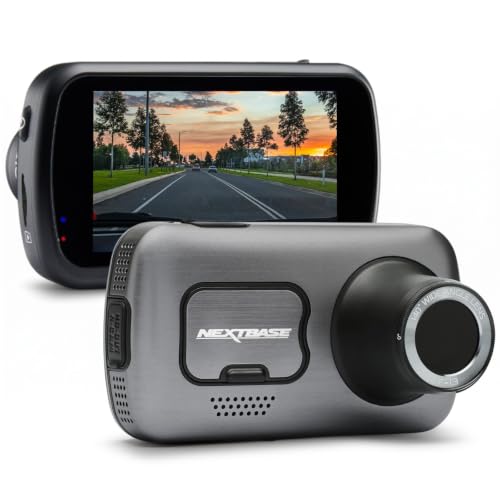
The 622GW is Nextbase’s flagship Series 2 dash cam, model DVR622GW. It records 3840 x 2160 4K video at 30 frames per second, 1440p at 60 frames per second and 1080p at 120 frames per second, through a 140-degree lens with an f/1.3 aperture. A 3-inch HD IPS touchscreen handles setup and playback, and touch control is listed as the primary control method on the listing, alongside Alexa voice control for hands-free commands.
Connectivity is a strong point. Bluetooth 5.0 handles the quick pairing and Emergency SOS link to your phone, while Wi-Fi supports fast transfer of clips to the MyNextbase Connect app for viewing, editing and sharing. GPS is built into the powered Click&Go PRO mount rather than the camera body, and the mount also carries the polarising filter compatibility and a neat magnetic connection that makes removing the camera simple.
The camera uses microSD cards, with the Amazon listing specifying support up to 128 GB, and Nextbase recommends high-endurance U3 cards for reliable loop recording. A small internal lithium-polymer battery supports the parking mode and emergency functions when the engine is off, but this is a camera designed to run from vehicle power, not a standalone battery device. The unit weighs 170 grams and carries a one-year limited warranty.
Strengths
- True 4K recording with 1440p at 60fps and 1080p slow motion as alternatives
- Digital image stabilisation and a built-in polarising filter for cleaner footage
- 10 Hz GPS with what3words for precise location data
- Emergency SOS and Alexa built in, which few dash cams combine
- Modular design accepts rear and cabin camera add-ons later
- Large 3-inch touchscreen makes setup and clip review straightforward
Trade-offs
- Front camera only in the box; rear coverage costs extra
- Stabilisation applies at 1440p rather than at full 4K
- Emergency SOS and app features depend on a paired smartphone and completed app setup
- The internal battery is small, so extended parking recording needs a hardwire kit
- Card support tops out at 128 GB on the listing, which fills quickly at 4K
Skip it if you need front and rear recording in a single purchase, want a screenless camera that hides behind the mirror, or only drive short local trips where a basic 1080p camera would cover your needs.
Which One Fits Your Situation
You commute on fast roads daily
The 622GW’s combination of 4K detail, 1440p at 60 frames per second and stabilisation suits motorway and dual carriageway driving, where incidents happen quickly and plates need to be readable at speed. The 10 Hz GPS also produces convincing speed data if a clip is ever disputed.
You drive rural routes at night
Enhanced Night Vision, the wide f/1.3 lens and what3words location pinpointing are all aimed at exactly this case. On unlit roads with no clear address, being able to share a 3-metre location square after an incident is a real advantage over cameras that only record coordinates.
You want protection while parked
Intelligent Parking Mode covers bumps and movement while the car is stationary. For occasional use the internal battery handles short stops; for overnight street parking, plan on the hardwire kit so the camera can keep watching without draining itself.
You drive for a rideshare platform
The front camera covers the road, and the optional cabin view module adds an interior record of passengers. Alexa voice control also helps when your hands need to stay on the wheel. Check your platform’s and region’s rules on in-car recording before fitting the cabin module.
You want the simplest possible setup
The touchscreen and magnetic powered mount make the 622GW easy to install and remove, but the app-linked features take a little setup time. If you will never use Emergency SOS, Alexa or app transfers, a simpler Series 2 model or a basic 4K camera may serve you just as well.
Common Mistakes
- Recording everything in 4K without checking card space, then finding older clips overwritten sooner than expected
- Using a cheap or slow microSD card that cannot keep up with 4K write speeds, causing gaps in footage
- Skipping the app setup, which leaves Emergency SOS inactive even though the camera itself is working
- Mounting the camera where the polarising filter cannot do its job, or forgetting to rotate it to cut reflections
- Assuming parking mode runs indefinitely on the internal battery without a hardwire kit
- Leaving the protective film on the lens or screen, which softens the image
- Never reviewing footage, so a loose mount or misaligned camera goes unnoticed until an incident matters
FAQ
Does the Nextbase 622GW record the rear of the car?
Not out of the box. It is a front-facing camera, and rear coverage comes from optional Series 2 modules that click into the unit: a rear view camera, a rear window camera or a cabin view camera, each sold separately.
What memory card does the 622GW need?
It records to microSD cards, and the Amazon listing specifies support up to 128 GB. A high-endurance U3 card is the sensible choice for continuous loop recording at 4K, where write demands are high.
How does Emergency SOS work?
If the camera detects a serious incident and you do not respond to the prompt, the system can notify emergency services through your paired phone, sharing your location and details you have entered in the app. It needs the app setup completed in advance to function.
Can the 622GW work without a phone?
Core recording, GPS logging and touchscreen playback all work without a phone. The phone connection is needed for Emergency SOS alerts, quick clip transfers over Wi-Fi and Alexa-related features, so the camera is most capable when paired.
Does image stabilisation work in 4K?
Nextbase applies the digital image stabilisation at the 1440p setting rather than in 4K mode. If your roads are rough and vibration is a problem, the stabilised 1440p mode at 60 frames per second may produce more usable footage than unstabilised 4K.
Is the 622GW still a current model?
Yes. Nextbase continues to sell the 622GW alongside its newer iQ range, and it remains the flagship of the Series 2 line. The iQ models add built-in 4G and subscription-based connected features, while the 622GW works fully without a monthly plan.
More from Amazon
Programs that pair well with the guide above. Offers and eligibility are set by Amazon and may change.
Free shipping on eligible items, Prime Video and more. Eligible new members can start with a free trial.
Start a Prime free trialAudiobooks and podcasts to listen to on the go. Eligible new members can start with a free trial.
Try Audible freeAd-free music streaming. Eligible new subscribers can start with a free trial.
Try Music Unlimited freeA free business account with business pricing and bulk-buying tools for work, shop or home office.
Create a business accountAs an Amazon Associate we earn from qualifying purchases.