Our Short List of 3
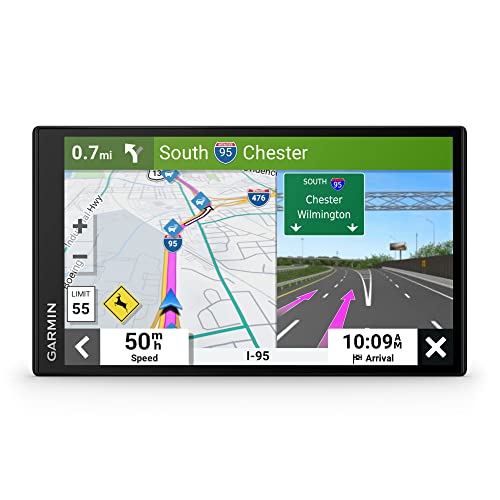
- Best for: A daily driver who wants a mid-size screen with phone-linked traffic.
- 6-inch display
- Model: 010-02469-00
- Live traffic and weather via phone and Garmin Drive app
- Best for: Highway driving where the largest screen makes the map easiest to read.
- 7-inch display
- Model: 010-02470-00
- Live traffic and weather via phone and Garmin Drive app
- Fulfilled by Amazon

- Best for: A driver who wants simple directions on a compact screen without traffic features.
- 5-inch high-resolution touchscreen
- Simple menus and driver alerts
- Storage: 16 GB
- Battery life: about 1 hour per the listing
All 5 Picks at a Glance
| Product | Specs | Action |
|---|---|---|
| Garmin DriveSmart 66, 6-inch |
| Check price on Amazon |
| Garmin DriveSmart 76, 7-inch |
| Check price on Amazon |
| Garmin Drive 53, 5-inch |
| Check price on Amazon |
 Garmin DriveSmart 55 & Traffic, 5.5-inch |
| Check price on Amazon |
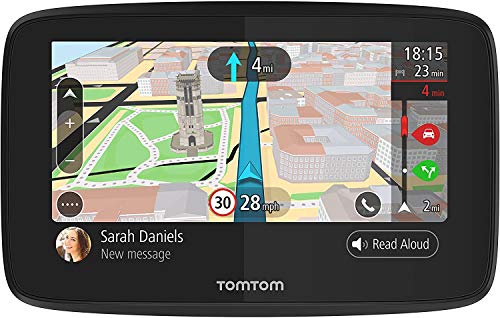 TomTom GO 620, 6-inch, Wi-Fi, Lifetime World Maps |
| Check price on Amazon |
Key takeaways
- Compare five GPS navigation units for cars, with real Amazon specs, screen sizes, traffic options and mount details to help you pick the right navigator.
A phone can navigate, but a phone also rings, overheats on the dash, and dies when the battery runs out. A dedicated GPS unit does one job and does it without interruption: it shows the road, speaks the next turn, and keeps working when the phone is in a pocket. Garmin still leads this category, and this guide is built around its Drive and DriveSmart lines, with a single TomTom pick for drivers who prefer its maps. Every unit below is a standalone navigator with its own screen and mount, listed on Amazon with a verifiable ASIN.
Screen size and traffic are the two decisions that matter most. A five-inch screen fits a small dash and stays out of the way, while a seven-inch screen is easier to read at a glance on the highway. Traffic is split too: some units need a phone and an app for live traffic, while one unit in this guide carries its own traffic receiver. Read both decisions before you pick.
Quick Picks
As an Amazon Associate we earn from qualifying purchases
| Product | Best for | Key spec from title |
|---|---|---|
| Garmin DriveSmart 66, 6-inch | A mid-size screen with phone-linked traffic | 6-inch display, model 010-02469-00 |
| Garmin DriveSmart 76, 7-inch | The largest screen for easy highway reading | 7-inch display, model 010-02470-00 |
| Garmin Drive 53, 5-inch | A compact navigator without live traffic | 5-inch touchscreen, 16 GB storage |
| Garmin DriveSmart 55 & Traffic, 5.5-inch | Built-in traffic without a phone | 5.5-inch display, traffic receiver included |
| TomTom GO 620, 6-inch | A TomTom alternative with world maps | 6-inch touchscreen, lifetime world maps |
How to Choose
Pick the Screen Size for Your Dash
Screen size is a trade between readability and dash space. A five-inch unit like the Drive 53 tucks onto a small dash and leaves the windshield clear, which suits a compact car or a driver who glances at the map only at turns. A seven-inch unit like the DriveSmart 76 is far easier to read at highway speed, but it needs a larger mounting area and can block the view in a small car. Measure the dash space where the suction mount will sit, and imagine the screen at arm’s length before choosing.
Understand How Traffic Reaches the Unit
Live traffic does not come free with every navigator. The DriveSmart 66 and 76 need a phone paired with the Garmin Drive app to receive traffic and weather, which means the phone must be present and connected. The DriveSmart 55 is different: it ships with a traffic receiver built into the vehicle power cable, so it gets traffic without a phone at all. The Drive 53 has no live traffic, and the TomTom GO 620 gets real-time traffic through its own connection. Match the traffic method to how you actually drive.
Maps, Storage, and Updates
A navigator is only as good as its maps, so check what is included and how it updates. The TomTom GO 620 carries lifetime world maps, which suits a driver who crosses borders. Garmin units in this guide ship with regional maps and update through a computer connection, and the Drive 53 lists 16 GB of storage for map data. A unit with a microSD slot, like the GO 620, can grow its storage when maps get larger, while a unit without one is limited to what it shipped with.
Mounts, Power, and the Box
Every unit here ships with a suction cup mount and a vehicle power cable, so the car is ready the day the box arrives. Check the box contents in the listing before ordering, because a missing mount or cable turns a simple install into a second purchase. Also check the battery figure: the Drive 53 lists about one hour of battery life, which means it is a plugged-in device, not a handheld. Plan the cable route so it does not dangle across the dash or interfere with the shifter.
The 5 Best Options
Garmin DriveSmart 66, 6-inch
- Best for: A daily driver who wants a mid-size screen with phone-linked traffic.
- 6-inch display
- Model: 010-02469-00
- Live traffic and weather via phone and Garmin Drive app
A daily driver who wants a mid-size screen with phone-linked traffic.
Traffic and weather need a paired phone, so the phone must be present and connected.
The DriveSmart 66 sits in the middle of the Garmin line, and that middle is where most drivers land. Its six-inch display is large enough to read at a glance without crowding a normal dash, and it pairs with a phone and the Garmin Drive app for live traffic and weather. The buy signal in its listing is the strongest in this guide, which suggests steady demand rather than a fading model. For a daily driver who wants a modern navigator with traffic, the 66 is the balanced pick that asks for no compromise on size or features.
Garmin DriveSmart 76, 7-inch
- Best for: Highway driving where the largest screen makes the map easiest to read.
- 7-inch display
- Model: 010-02470-00
- Live traffic and weather via phone and Garmin Drive app
- Fulfilled by Amazon
Highway driving where the largest screen makes the map easiest to read.
The seven-inch screen needs a larger mounting area and may crowd a small dash.
The DriveSmart 76 is the largest screen in this guide, and its seven inches are aimed squarely at drivers who read the map at highway speed. Lane guidance, junction views, and street names are all easier to catch on a bigger display, and the 76 keeps the same phone-linked traffic and weather as the 66. The trade is dash space: a seven-inch unit needs a clear mounting area and can crowd a small windshield. For a larger car, a truck, or a driver whose eyesight prefers bigger text, the 76 is the pick that makes navigation effortless.
Garmin Drive 53, 5-inch
- Best for: A driver who wants simple directions on a compact screen without traffic features.
- 5-inch high-resolution touchscreen
- Simple menus and driver alerts
- Storage: 16 GB
- Battery life: about 1 hour per the listing
A driver who wants simple directions on a compact screen without traffic features.
No live traffic on the base 53, and the short battery life means it stays plugged in.
The Drive 53 is the simplest navigator in this guide, and its simplicity is the point. A five-inch high-resolution touchscreen, simple menus, and driver alerts cover the core job without traffic or weather features to configure. Its 16 GB of storage holds the maps it needs, and the box includes the navigator, a suction cup mount, a vehicle power cable, a USB cable, and documentation. The listing gives about one hour of battery life, so this is a plugged-in device rather than a handheld. For a driver who wants directions and nothing else, the 53 is the least complicated way to get them.
Garmin DriveSmart 55 & Traffic, 5.5-inch
- Best for: A driver who wants live traffic without pairing a phone.
- 5.5-inch display, 1280×720 LCD
- Weight: 5.3 oz
- Model: 010-02037-02
- Traffic receiver included in the vehicle power cable, no phone needed
A driver who wants live traffic without pairing a phone.
The bundle listing with a carry case is a different product — use this ASIN for the standalone unit, and confirm it resolves on amazon.com.
The DriveSmart 55 is the only unit in this guide that brings its own traffic. Its traffic receiver is built into the vehicle power cable, so live traffic arrives without a phone, an app, or a data connection. The 5.5-inch display sits between the compact 53 and the larger 66, and the 1280 by 720 LCD is sharp for its size. At 5.3 ounces it is light on the mount, and the box includes the navigator, mount, traffic receiver and power cable, USB cable, and manual. One listing detail needs care: a bundle with a carry case is a different listing, so order by this ASIN.
TomTom GO 620, 6-inch, Wi-Fi, Lifetime World Maps
- Best for: A driver who prefers TomTom maps and wants lifetime world coverage.
- 6-inch touchscreen, 800×480
- Storage: 16 GB, expandable with microSD to 32 GB
- Real-time traffic
- Lifetime world maps
A driver who prefers TomTom maps and wants lifetime world coverage.
A 2017 model discontinued by TomTom — confirm it still sells; do not use the European variant ASIN from roundups.
The TomTom GO 620 is the single TomTom pick in this guide, and it earns its place with maps. Lifetime world maps cover international driving without extra purchases, and real-time traffic, voice control, and hands-free calling round out the feature set. The six-inch touchscreen and 16 GB of storage, expandable with a microSD card to 32 GB, keep it competitive with the Garmin units around it. One flag matters: this is a 2017 model that TomTom has discontinued, so confirm the listing still sells before ordering, and never use the European variant ASIN that appears in some roundups.
Which One Fits Your Situation
You drive daily in traffic
Choose the DriveSmart 55. Its built-in traffic receiver needs no phone, so traffic arrives every time you drive, even when the phone stays in your pocket. The 5.5-inch screen is easy to read without crowding the dash, and the traffic receiver in the power cable means there is nothing extra to pair or charge.
You want the biggest screen for highway trips
Choose the DriveSmart 76. Seven inches make lane guidance and junction views easy to catch at speed, and the phone-linked traffic keeps you informed on long drives. Check the dash space first, since the screen is large, and plan the cable route so it does not dangle across the dash.
You want the simplest navigator possible
Choose the Drive 53. Five inches, simple menus, and driver alerts cover the core job with nothing to configure. Accept that it has no live traffic and that it stays plugged in while driving, and keep the suction mount clean so the small unit stays put on rough roads. The five-inch screen also leaves the windshield clear for a better view of the road.
You prefer TomTom and drive internationally
Choose the GO 620. Lifetime world maps and real-time traffic suit a driver who crosses borders, and the microSD slot lets storage grow as maps get larger. Confirm the listing still sells, since the model is discontinued, and check the map coverage for the countries you actually drive in. The lifetime maps mean no extra purchases when you cross a border.
Common Mistakes
- Buying the DriveSmart 55 bundle with a carry case and expecting the standalone unit’s price and contents, when the two listings differ.
- Assuming every Garmin in this guide has live traffic, when only the phone-linked models and the 55 have it.
- Choosing a seven-inch screen for a small dash where it blocks the view and distracts from the road.
- Ordering the TomTom GO 620 by a European variant ASIN found in a roundup, instead of the ASIN in this article.
- Treating a GPS tracker or a stereo with navigation as a standalone navigator, when neither is built for the dash.
Frequently Asked Questions
Does a GPS unit need a phone to work?
No. Every unit here navigates on its own. Only live traffic and weather differ: the DriveSmart 66 and 76 need a phone and the Garmin Drive app, the DriveSmart 55 has its own traffic receiver, and the Drive 53 has no live traffic at all.
What is the difference between the DriveSmart 55 and the DriveSmart 55 bundle?
The standalone unit is one listing, while the bundle adds a carry case under a different ASIN. The two listings have different contents, so order by the standalone ASIN in this article if you want the unit without the case.
Can I update the maps on these units?
Yes. Garmin units update through a computer connection, and the TomTom GO 620 updates over Wi-Fi. The GO 620 also has a microSD slot that expands storage to 32 GB when map files grow larger, so an older unit can still hold current maps without running out of space.
Is the TomTom GO 620 still a good buy if it is discontinued?
It can be, because the hardware and lifetime world maps still work. The risk is availability: a discontinued model can sell out without warning, so confirm the listing is live before ordering and check that the seller is the one you expect.
More from Amazon
Programs that pair well with the guide above. Offers and eligibility are set by Amazon and may change.
Free shipping on eligible items, Prime Video and more. Eligible new members can start with a free trial.
Start a Prime free trialAudiobooks and podcasts to listen to on the go. Eligible new members can start with a free trial.
Try Audible freeAd-free music streaming. Eligible new subscribers can start with a free trial.
Try Music Unlimited freeA free business account with business pricing and bulk-buying tools for work, shop or home office.
Create a business accountAs an Amazon Associate we earn from qualifying purchases.