Key takeaways
- Compare the best dash cams for beginners: simple setup, clear video, voice or app control and automatic recording from Garmin, Rexing, Viofo and more.
A first dash cam should do three things well: start recording on its own every time you drive, capture number plates and road signs clearly, and stay out of your way the rest of the time. Beginners do not need a laboratory of settings. They need a camera that mounts in minutes, formats its own memory card, locks the important clips when something happens, and makes it simple to pull a video onto a phone after an incident. This roundup compares five beginner-friendly dash cams across the budget, mid-range and premium tiers, from a screen-free mini camera you can forget is even fitted, to a larger screened model that is easy to aim and review on the spot. Every pick records automatically, loops over the oldest footage when the card fills, and uses a G-sensor to protect collision clips from being overwritten.
As an Amazon Associate, we earn from qualifying purchases.
Quick Answer
For most beginners, the Garmin Dash Cam Mini 3 is the easiest first dash cam: it is tiny, has no screen to distract you, starts recording automatically, and answers to voice commands. The Rexing V1 suits drivers who want a screen for aiming and playback, while the Viofo A119 Mini 2 adds sharper 2K video, GPS and fast Wi-Fi in a compact body.
Table of Contents
- Garmin Dash Cam Mini 3
- Rexing V1 4K Dash Cam
- Viofo A119 Mini 2
- Vantrue E1 Dash Cam
- Thinkware F70 Pro
- How to Choose
- Who Should Skip
- FAQ
- Final Verdict
Garmin Dash Cam Mini 3
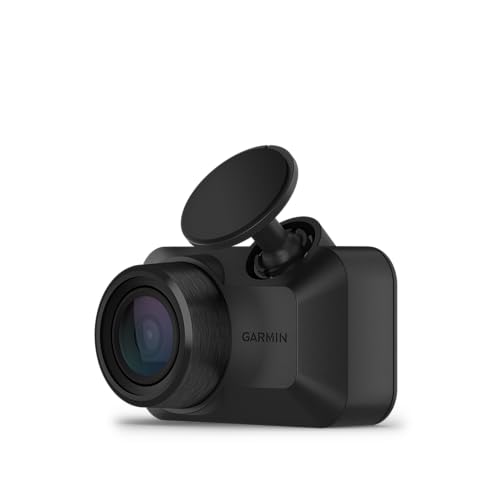
The Mini 3 is the closest thing to a fit-and-forget dash cam. It is roughly the size of a car key, hides behind the rearview mirror, and has no screen at all, which removes the biggest beginner distraction. A built-in Clarity polarizer helps cut windshield glare and reflections, and the 140-degree field of view covers multiple lanes without stretching the edges of the picture too far. Voice control is the feature beginners feel most: saying the wake phrase lets you save a video, start or stop audio recording, or take a still picture without taking your hands off the wheel. When the camera detects an incident, it automatically saves the surrounding footage. Saved clips sync to the Garmin Drive app over Wi-Fi and Bluetooth when your phone is nearby, and an optional subscription adds cloud storage and parked-car alerts through the Garmin Vault service. Parking protection requires a constant power cable or hardwire kit, sold separately. This is a premium-tier pick for drivers who value simplicity over a display.
Specs:
– Resolution: 1080p Full HD
– Field of view: 140 degrees
– Display: none, screen-free design
– Lens: built-in Clarity polarizer
– Controls: voice control, Garmin Drive app
– Storage: microSD card required, sold separately
– Extras: automatic incident detection, optional Vault cloud features
Rexing V1 4K Dash Cam
The Rexing V1 takes the opposite approach to the Garmin: a 2.4-inch LCD screen makes it the easiest camera here to aim during installation and to review footage from the driver seat, with no phone required. It records in 4K Ultra HD, and its 170-degree wide-angle lens takes in the full width of most intersections. A supercapacitor replaces the internal battery, which is the more durable choice for a camera that bakes on a windshield through summer. Built-in Wi-Fi connects to the Rexing Connect app for downloads and settings, and the G-sensor locks the current file when it detects a collision. Parking monitor functions need one of the brand hardwire kits, sold separately. For a beginner who wants the reassurance of seeing exactly what the camera sees, this mid-range model is the most confidence-building place to start.
Specs:
– Resolution: 4K Ultra HD, 2160p
– Field of view: 170 degrees
– Display: 2.4-inch LCD screen
– Power design: supercapacitor
– Connectivity: Wi-Fi with Rexing Connect app
– Storage: supports cards up to 256GB, sold separately
– Extras: G-sensor, wide dynamic range, loop recording
Viofo A119 Mini 2
The A119 Mini 2 is the pick for beginners who want one camera that will stay satisfying as they learn. Its Sony STARVIS 2 image sensor records 2K video at 60 frames per second, or HDR video at 30 frames per second for difficult light, which helps keep plates readable at night and in tunnels. The wedge-shaped body sits flat against the windshield and stays discreet. Built-in GPS logs speed and location into the footage, 5GHz Wi-Fi moves clips to the Viofo app faster than the older 2.4GHz standard, and voice control covers the common commands while driving. A supercapacitor handles heat, and buffered parking mode is available when the camera is paired with the brand HK4 hardwire kit, sold separately. The memory card is also sold separately, and the camera supports up to 512GB. It sits in the mid-range tier and rewards a few extra minutes spent in the settings menu.
Specs:
– Resolution: 2K 1440p at 60fps, HDR at 30fps
– Sensor: Sony STARVIS 2 IMX675
– Connectivity: 5GHz Wi-Fi, Viofo app
– GPS: built in, with speed and route logging
– Power design: supercapacitor
– Storage: supports cards up to 512GB, sold separately
– Extras: voice control, parking mode with optional hardwire kit
Vantrue E1 Dash Cam

The Vantrue E1 is a small cube-shaped camera built around hands-free use. It records at 2.7K resolution, connects to the Vantrue app over Wi-Fi, and includes GPS for speed and location data. Voice control handles everyday commands, and the included wireless remote controller gives you a single big button to lock a clip manually, which is the simplest possible interaction for a new owner. The supercapacitor design avoids battery swelling in hot cabins, and buffered motion detection parking mode watches the car while it is parked when a hardwire kit, sold separately, is fitted. The E1 supports memory cards up to 512GB, sold separately. As a mid-range option it suits beginners who want app control and a physical save button without moving to a large screened camera.
Specs:
– Resolution: 2.7K
– Connectivity: Wi-Fi with Vantrue app control
– GPS: built in, with speed display
– Controls: voice control plus wireless remote controller
– Power design: supercapacitor
– Storage: supports cards up to 512GB, sold separately
– Extras: buffered parking mode with optional hardwire kit
Thinkware F70 Pro
The F70 Pro is the budget-tier friendly option that still covers the safety extras. It records 1080p Full HD through a 140-degree wide-angle lens, uses Super Night Vision processing for dark roads, and connects over Wi-Fi to the Thinkware app for settings and downloads. Unusually for this tier, a 32GB memory card is included in the box, so there is one less accessory to remember. Smart Parking Mode and impact detection work when the camera is hardwired, and integrated thermal protection guards against overheating shutdowns. Optional GPS enables safety camera alerts. The compact body mounts neatly behind the mirror, and the feature set stays deliberately short, which is exactly what a first-time owner needs.
Specs:
– Resolution: 1080p Full HD
– Field of view: 140 degrees
– Connectivity: Wi-Fi with Thinkware app
– Storage: 32GB microSD card included
– Power design: integrated thermal protection
– Extras: Super Night Vision, Smart Parking Mode when hardwired
– Optional: GPS antenna for safety camera alerts
How to Choose
Start with how you want to interact with the camera. A screen-free model like the Garmin Mini 3 or the compact Thinkware disappears behind the mirror and suits set-and-forget drivers, while a screened model like the Rexing V1 is easier to aim and check. Resolution matters less than sensor quality: a good 1080p camera with a modern sensor reads plates reliably, 2K adds margin at distance, and 4K helps when you crop into a frame. Check the power design next; supercapacitor models tolerate hot windshields better than battery models. Decide whether you need GPS, which stamps speed and location into evidence, and whether parking mode matters, since every camera here needs a separate hardwire kit or constant power cable for parked recording. Finally, budget for a high-endurance microSD card unless one is included, and format it in the camera before first use.
Who Should Skip
Skip this beginner category if you need rear or cabin coverage: all five cameras record the front view only, so rideshare drivers and anyone worried about rear-end disputes should look at dual-channel or three-channel systems instead. Skip the screen-free models if you are not comfortable using a phone app for setup and playback. Skip basic 1080p picks if you regularly drive unlit rural highways at speed and need the extra plate-reading distance of a 2K or 4K sensor. And if your car will sit parked for days in a public lot, a hardwired parking setup with voltage protection matters more than the camera itself, so plan that installation first.
FAQ
Do I need a memory card for a first dash cam?
Usually, yes. Most dash cams, including four of the five picks here, require a microSD card that is sold separately; the Thinkware F70 Pro is the exception with a card in the box. Choose a high-endurance card rated for continuous recording, and format it in the camera.
Will a dash cam drain my car battery while parked?
While driving, no: the camera runs from the accessory socket or USB power. Parking mode is different, because the camera keeps watching after the engine stops. That requires a hardwire kit with low-voltage cut-off protection or a constant power cable, which stops recording before the battery runs too low.
Is 1080p enough, or should a beginner pay for 2K or 4K?
1080p from a good sensor is enough for most incidents, and it keeps files small. Moving to 2K or 4K mainly buys extra detail when you zoom into a plate across several lanes. Beginners are better served by reliable auto-recording and a good sensor than by resolution alone.
Can I install a dash cam myself?
Yes. Every pick here mounts to the windshield with adhesive or a bracket and plugs into a 12V socket or USB port, and tucking the cable along the headliner takes a few minutes. Hardwiring for parking mode is the only step many beginners hand to an installer.
Final Verdict
For a first dash cam, simple beats elaborate. The Garmin Dash Cam Mini 3 is the easiest camera here to live with, the Rexing V1 is the most approachable for drivers who want a screen, and the Viofo A119 Mini 2 is the step-up pick with 2K video and GPS. The Vantrue E1 adds a genuinely useful wireless save button, and the Thinkware F70 Pro keeps the starting cost of ownership low by including a memory card. Pick the interaction style you will actually use, add a high-endurance card, and every model in this roundup will quietly do its job.


More from Amazon
Programs that pair well with the guide above. Offers and eligibility are set by Amazon and may change.
Free shipping on eligible items, Prime Video and more. Eligible new members can start with a free trial.
Start a Prime free trialAudiobooks and podcasts to listen to on the go. Eligible new members can start with a free trial.
Try Audible freeAd-free music streaming. Eligible new subscribers can start with a free trial.
Try Music Unlimited freeA free business account with business pricing and bulk-buying tools for work, shop or home office.
Create a business accountAs an Amazon Associate we earn from qualifying purchases.